Neural Minute may earn a commission if you buy through our links. It doesn’t change our verdicts. How we test · How we make money
To swap a face on Higgsfield, open the Face Swap app, upload the target photo or clip and a clear photo of the face to insert, then click Face Swap. On Nov 25, 2026, a photo swap cost 2 credits and took about 80 seconds; a 5-second video swap with Genjutsu cost 35 credits, or one of the free generations included in Plus. We ran both on a paid Plus account, with AI-generated people only.
What do you need before you start?
- A Higgsfield account. Higgsfield’s FAQ gives 5 free photo face swaps a day; video face swaps need a paid plan.
- A target: the photo, or a clip of 4 to 30 seconds, whose face you want to replace. One face per generation.
- A face to insert: a sharp, front-facing photo in even light.
- The right to use both. Before the first upload, Higgsfield asks you to certify that you own the media and that every visible person has given consent. Swapping someone’s face without consent can break the terms and the law.
How do you face swap a photo on Higgsfield?
- Go to Apps > Face Swap and pick the Image tab.
- Upload the photo with the face to replace in Target Image.
- Upload the face to insert in Your Photo, and accept the upload agreement the first time.
- Click Face Swap. The button shows the price: 2 credits on our account. The job goes “In queue”, then “In progress”.
- Download the result, or send it on to Animate to turn it into a video.
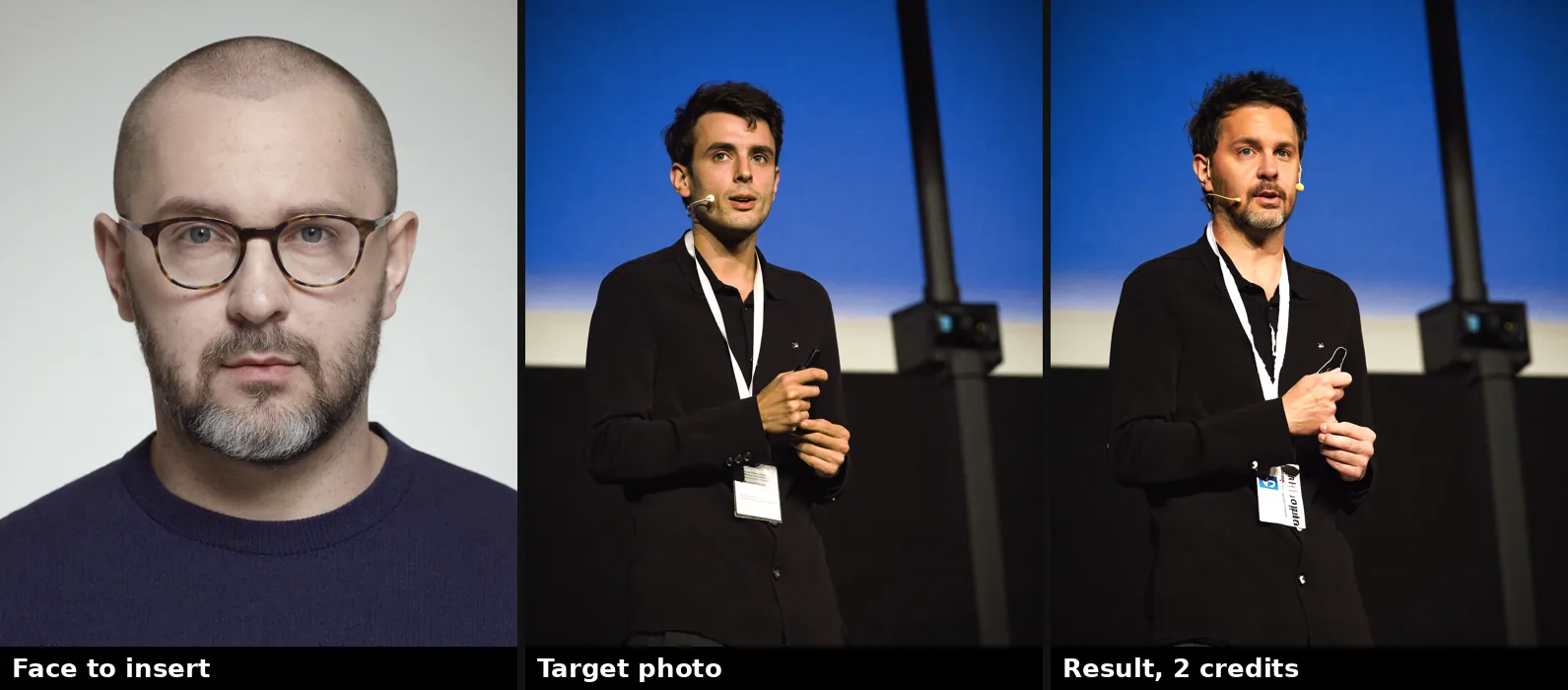
What we got: the grey beard and the skin tone came across, the pose, light and badge stayed, but the glasses were dropped and much of the original face remained. A white outline also appeared around the clicker in the speaker’s hand. For a closer likeness, use the video route below, even on a short clip.
On this page
How do you face swap a video on Higgsfield?
- On the same Face Swap page, stay on the Video tab, mode Motion transfer.
- Click Add a reference video and upload a clip of 4 to 30 seconds. You can trim it in the editor that opens.
- Click Add your characters and pick the face photo.
- Choose Genjutsu (35 credits for our 5-second clip in 720p) or Genjutsu Lite (12 credits, shown as 36 crossed out). On Plus, the switch “Use free generations” showed 3 left; with it on, the job costs nothing, and a failed free attempt is restored.
- Click Face Swap. Higgsfield moves you to the video page, where the job runs. Ours took about 6 minutes.
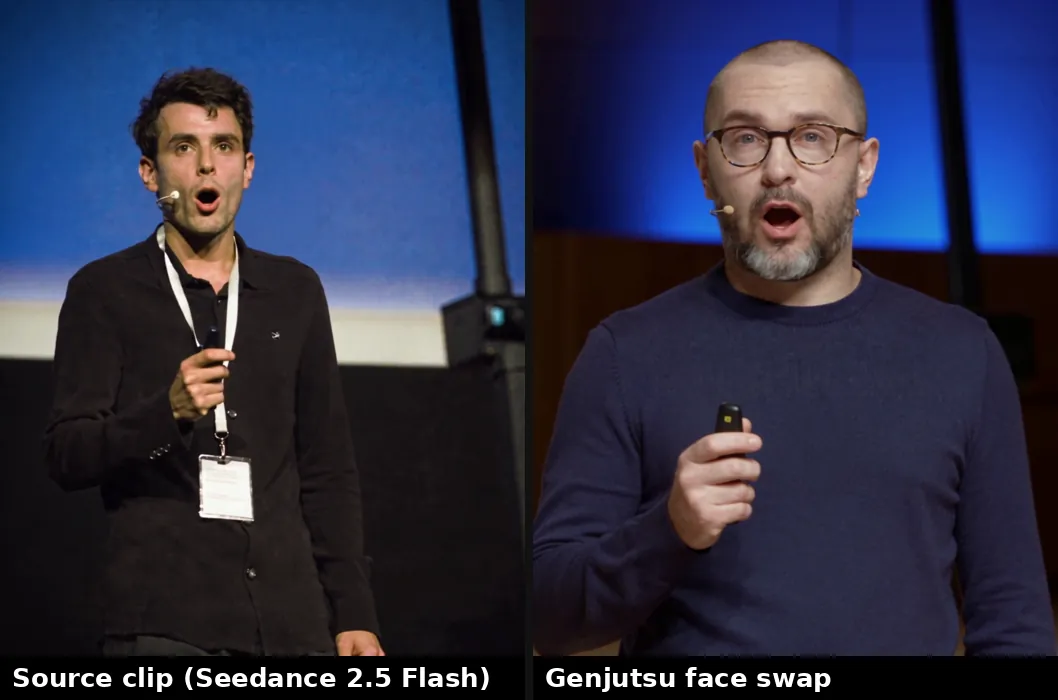
What we got: a much closer likeness than on the photo, with the shaved head, the glasses, the grey beard and even the sweater of the face photo, and the gestures of the source clip. Genjutsu redraws the whole scene, though: the background changed, the badge and lanyard disappeared and the framing moved closer. It is a character swap more than a face swap.
How do you get a better Higgsfield face swap?
- Use a face photo where glasses, beard and hair are clearly visible: the video swap carried them over, the photo swap did not carry the glasses.
- Pick a target where the face is large and front-facing. One face is swapped per generation.
- For a clip, try Genjutsu Lite first at 12 credits, then the full Genjutsu if the result is too soft.
- Read the price on the button before you click: it changes with the model and the resolution.
How much does a Higgsfield face swap cost?
2 credits for a photo and 35 credits for a 5-second video with Genjutsu, 12 with Genjutsu Lite, on Nov 25, 2026. At the Plus list price of $59 for 1,200 credits, that is about $0.10 per photo and $1.72 per 5-second Genjutsu clip, by our arithmetic. The plans and the current offers are on our Higgsfield pricing page.
What should you read next?
Our Higgsfield review covers all 12 tests, including the model comparison and the Earth Zoom effect, and our Earth Zoom tutorial explains the orbit-to-street clip.
Tested by Neural Minute on a Higgsfield Plus account on Nov 25, 2026. Sources: higgsfield.ai/apps/face-swap and its FAQ, read the same day.
Spotted an outdated price or an error on this page? Request an update. Want us to cover another tool? Suggest a review.