Neural Minute may earn a commission if you buy through our links. It doesn’t change our verdicts. How we test · How we make money
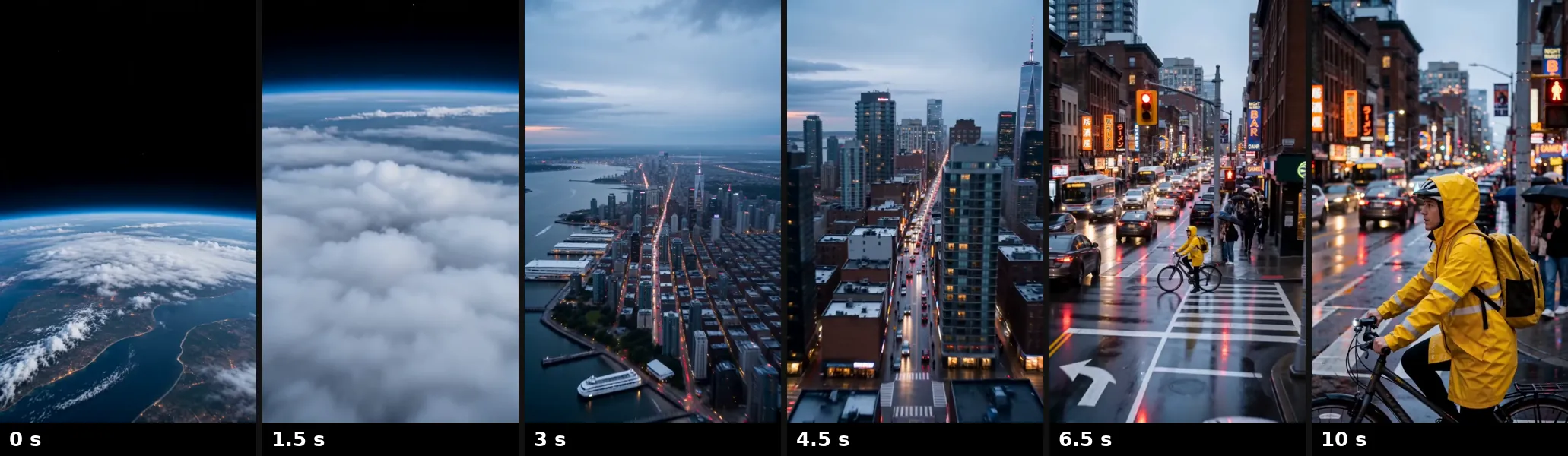
To make an earth zoom out with Higgsfield, generate an Earth Zoom clip from one photo, then play it backwards: the preset always dives from orbit to your photo, and reversing it gives the pull-back to space seen on social media. In our test on Nov 25, 2026 the clip cost 25 credits in 720p and was ready in about 4 minutes; starting from a text prompt, with the photo made by Nano Banana Pro, the whole video cost 27 credits.
What do you need before you start?
- A Higgsfield account with at least 25 credits for a 720p clip, 27 if you also generate the photo.
- One photo in PNG, JPEG or WebP. A street, a landmark or a person outdoors works best: the effect needs a place to land on.
- The right to use the photo: before the first upload, Higgsfield’s media upload agreement asks you to confirm your rights to the media and the consent of every visible person, and reminds you that credits are spent.
- Any video editor that can reverse a clip, or the free ffmpeg tool.
No photo? How do you make the starting image?
Generate it first. We wrote a prompt for a cyclist in a yellow raincoat at a rainy, neon-lit crosswalk and ran it through Nano Banana Pro on Higgsfield in 9:16 at 1K: 2 credits, about 60 seconds, a 768 × 1376 image. A vertical image with one clear subject on a recognisable street gives the zoom something precise to land on.

On this page
- 01What do you need before you start?
- 02No photo? How do you make the starting image?
- 03How do you make an earth zoom on Higgsfield?
- 04How do you turn it into an earth zoom out?
- 05What makes a better earth zoom?
- 06How much does a Higgsfield earth zoom cost?
- 07Questions about the Higgsfield earth zoom
- 08What should you read next?
- 09Update log
How do you make an earth zoom on Higgsfield?
- Open the Earth Zoom effect on higgsfield.ai and click Generate. It opens the effect editor.
- Upload your photo in the Image box and accept the media upload agreement the first time.
- Choose Resolution and Aspect Ratio. We used 720p and 9:16 for a vertical short.
- Click Generate. The button showed 25 credits. The job went through “Processing” and “Generating”, and ours was ready about 4 minutes after launch.
- Open the clip and click Download. Ours was a 720 × 1280 file of 10 seconds, with generated sound.
How do you turn it into an earth zoom out?
Reverse the clip. In CapCut, Premiere or DaVinci Resolve, use the clip’s Reverse option. With ffmpeg, one command reverses picture and sound; it is the command that produced the video at the top of this page:
ffmpeg -i earth-zoom.mp4 -vf reverse -af areverse earth-zoom-out.mp4The generated sound plays backwards too, which rarely sounds right: replace it with your own track, or drop the -af areverse part and mute the audio in your editor.
What makes a better earth zoom?
- One subject, clearly placed. Our cyclist in yellow stayed recognisable down to the backpack and the bike; a crowded scene gives the zoom nothing to aim for.
- Expect an invented city. The descent passed over a city at dusk that looked like Manhattan, not over a real map of the place in the photo.
- Check the file, not the panel. Higgsfield’s details panel listed the output as 1080 × 1920 while the downloaded file was 720 × 1280, the resolution we had paid for.
- Vertical for shorts. 9:16 fits TikTok, Reels and YouTube Shorts without cropping the subject.
How much does a Higgsfield earth zoom cost?
25 credits for a 10-second clip in 720p on Nov 25, 2026, plus 2 credits if you generate the starting image with Nano Banana Pro. At the Plus list price of $59 for 1,200 credits, 25 credits come to about $1.23 by our arithmetic, and Starter’s 270 credits a month cover ten clips. The current plans and their dates are on our Higgsfield pricing page.
Questions about the Higgsfield earth zoom
Is the Higgsfield earth zoom free? It cost 25 credits on our paid Plus account on Nov 25, 2026, the price shown on the Generate button.
How long does it take? About 4 minutes for our 10-second 720p clip.
Can Higgsfield zoom out directly? The preset only zooms in, from space to the ground. The zoom out is the same clip reversed.
Does it show my real city? No. The descent is generated, so the city on the way down is invented; only the final shot matches your photo.
What should you read next?
Our Higgsfield review covers 12 tests with their costs, Nano Banana Pro on Higgsfield covers the image model used for the starting photo, and our Higgsfield face swap tutorial covers photo and video swaps.
Tested by Neural Minute on a Higgsfield Plus account on Nov 25, 2026; reversed clip produced on Nov 26, 2026.
Update log
Nov 26, 2026: zoom out video added, starting-image step with Nano Banana Pro, generation time, tips and FAQ.
Nov 25, 2026: tutorial published after our paid test.
Spotted an outdated price or an error on this page? Request an update. Want us to cover another tool? Suggest a review.