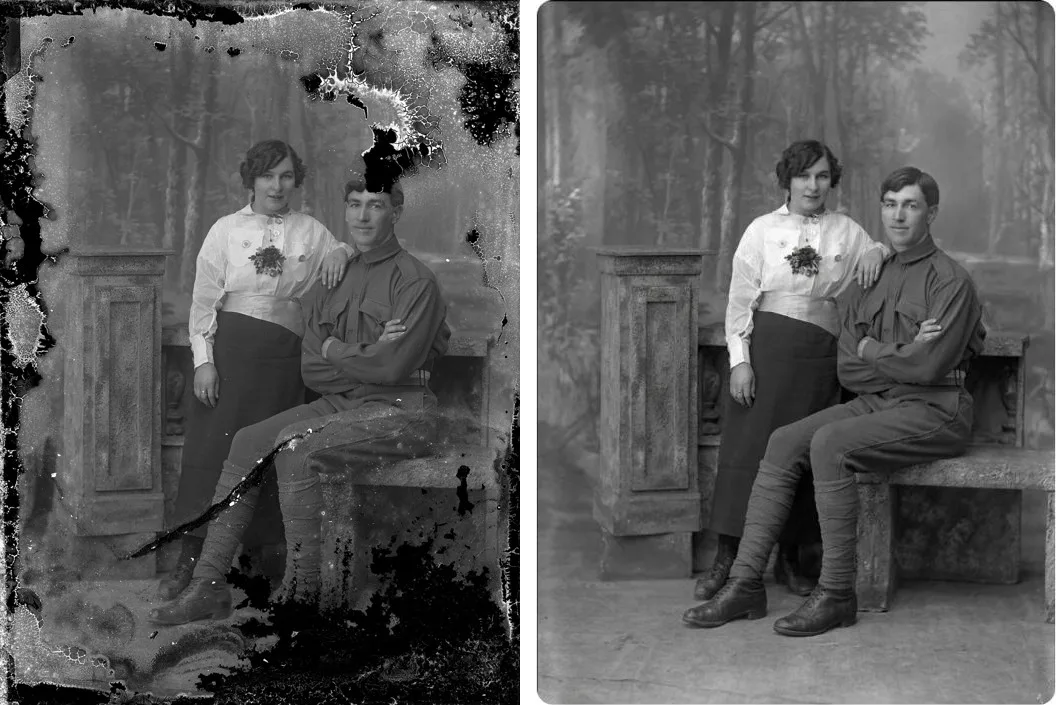
The prompt below restored a damaged 1910s studio portrait in Google Gemini’s free plan in under 30 seconds: stains, scratches and eaten edges gone, both faces kept as they were. What it did not do is upscale. Gemini returned an image of 880 × 1,197 pixels from our 1,280 × 1,741 scan, and when we then asked for 8K it answered “8K-equivalent quality” while delivering 896 × 1,200 pixels. Restore in a chat AI, then enlarge with a dedicated upscaler. Tested on Nov 26, 2026.
Which prompt restores an old photo without changing the faces?
Name every kind of damage, then lock what must not move: faces, expressions, clothes, pose, lighting and the background. Without that second part, image models tend to “improve” faces. This is the exact prompt we sent with the photo attached:
Gemini · tested Nov 26, 2026
Restore a black-and-white photo
Restore this old black-and-white photograph. Remove the dark stains, scratches, cracks and missing patches on the edges and across the image. Keep both people exactly as they are: same faces, expressions, hair, clothes, pose and lighting. Do not add color, do not beautify or change the faces, and keep the original studio backdrop and furniture. Output a clean, sharp, high-resolution black-and-white photo with the same framing.
What to change for your photo: “both people” to the number of people in yours; “studio backdrop and furniture” to what is behind them; and the list of damage to what you actually see (fold lines, a torn corner, a faded area, newspaper dots).
What did Gemini get right, and what did it get wrong?
- Right: the large stain over the man’s head, the dark patches on the edges, the crack across his legs and the scratches all disappeared. Faces, hair, the brooch, the bench, the column and the painted forest backdrop stayed in place, and it did not add color.
- Wrong: the output is smaller than the input. The answer text also claimed “high-resolution” and later “8K-equivalent”; neither matched the file.
- Check yourself: zoom on eyes, hands and any text before you print or share. Our run kept the faces, but a restored face is a reconstruction where the original was damaged.
Can a chat AI upscale a photo to 8K?
Not in our test. We measured the size of each image Gemini returned in the browser:
| Step | What Gemini said | Image size we measured |
|---|---|---|
| Original scan | Not applicable | 1,280 × 1,741 px |
| Restore, “high-resolution” in the prompt | “The photograph is now clean and high-resolution” | 880 × 1,197 px |
| Follow-up: “upscale to 8K (7680 pixels on the long side)” | “enhanced to 8K-equivalent quality” | 896 × 1,200 px |
At 300 dots per inch, 896 × 1,200 pixels prints at about 3 × 4 inches. For a larger print, run the restored file through a dedicated upscaler that lets you choose 2× or 4×, such as the free, open-source Upscayl or Topaz Photo, and check the result at 100%. We have not tested those upscalers yet.
Which follow-up prompts help?
Keep the same chat so the model works on its own result, and change one thing at a time:
- “Keep everything the same, only remove the remaining white spots in the top left corner.”
- “The man’s face changed slightly. Go back to the original features from my photo.”
- “Same restoration, but leave the edges of the print as they are.”
These are the fixes we would use next; this page will show their results once we have run them on the same photo.
Questions about restoring old photos with AI
Is there a free AI to restore old photos? Yes. Our test used Gemini’s free plan with a Google account; it took one prompt and under 30 seconds. The catch is the output size, about 900 × 1,200 pixels in our run.
Can AI restore a photo to 8K? Not a chat AI in our test: asked for 7,680 pixels, Gemini returned 896 × 1,200 while calling it “8K-equivalent”. Use a separate upscaler for size.
Will AI change the faces in my photo? It can. Say in the prompt to keep faces, expressions and features unchanged, then compare both versions side by side at full size.
Can I upload any old photo? Only photos you have the rights to use. Gemini shows a notice asking you to confirm that before it edits an image; family photos you own are the usual case.
More prompts in the AI prompt library, and the tools compared in best AI for photo editing. Want a step-by-step version? It is project 3 in AI projects for beginners.
Update log
Nov 26, 2026: page published with our Gemini test (restoration prompt and 8K request).