Neural Minute may earn a commission if you buy through our links. It doesn’t change our verdicts. How we test · How we make money
The best ChatGPT self-portrait prompts say what must stay (face shape, eyes, nose, mouth, one distinctive mark) and what can change (light, background, style). Below are 18 prompts sorted by style, plus a face-lock line you can paste under any of them. The first three are the ones we ran on the same selfie, with the results.
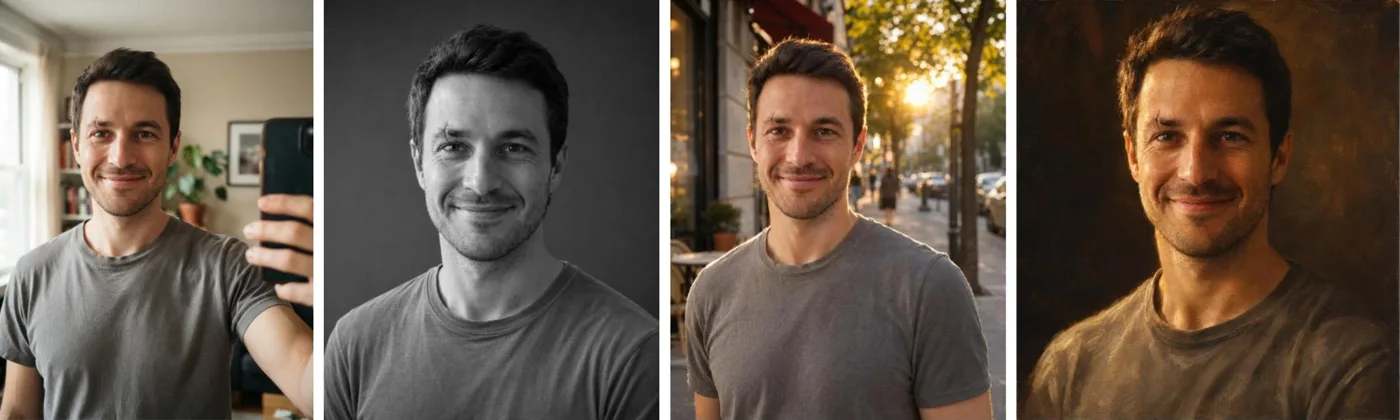
About the face in our tests: “Alex” is a fictional man we generated with Google Gemini, not a photo of a real person. We don’t put a stranger’s real face through a public test. We gave him a small scar on the left eyebrow on purpose, to see whether ChatGPT keeps a detail that is easy to lose.
Which style do you want?
Pick a row, jump to the prompt, copy it, then add the face-lock line if the prompt does not already have one. Prompts marked Tested are the ones we ran in ChatGPT. The others are prompts to try, built on the same pattern.
| Style | Prompts | Good for |
|---|---|---|
| Tested in ChatGPT | 1 to 3 | A safe first try: studio, golden hour, oil painting |
| Studio | 4 and 5 | Clean profile pictures, dramatic portraits |
| Natural light | 6 and 7 | Photos that look like a friend took them |
| Editorial | 8 and 9 | Magazine and fashion looks |
| Film | 10 and 11 | Grain, old film colors, movie stills |
| Painting | 12 | Soft watercolor (oil is prompt 3) |
| Black and white | 13 | Film noir drama (studio black and white is prompt 1) |
| Illustration | 14 to 16 | Caricature, 3D cartoon, comic book |
| No photo | 17 and 18 | The “based on what you know about me” trend |
| Work headshot | Separate page | LinkedIn and résumé photos |
How do you stop ChatGPT from changing your face?
Tell it exactly what must stay the same, and tell it not to beautify you. Image models redraw the whole picture, so without that instruction they drift toward a smoother, younger, more symmetrical face. Paste this line at the end of any prompt below, and replace the part in brackets with your own detail:
Face-lock line · paste under any prompt
Keep my face exactly as in my photo: same face shape, eyes, nose, mouth, eyebrows, hairline and skin tone, and keep [your detail: a mole, freckles, glasses, a gap in your teeth]. Do not make me younger, slimmer or more symmetrical. Change only what this prompt asks for.
Three habits matter as much as the wording. Upload one clear, well-lit selfie, facing the camera. Start every new style from your original photo, not from the last result, so changes do not stack up. And send one style per message, so you can see which instruction did what.
Which prompts did we test, and did ChatGPT keep the face?
Yes, ChatGPT kept the same face in all three styles: face shape, eyes, nose, smile, stubble and hairline matched the selfie. What drifted was the small scar, in two of the three images. These are the exact prompts we sent, in this order, in one conversation.
Tested · about 45 seconds
1. Black-and-white studio portrait
Turn this selfie into a professional black-and-white studio portrait. Keep my face exactly the same: same face shape, eyes, nose, mouth, eyebrows (including the small scar on my left eyebrow), stubble, hairline and skin texture. Do not make me younger, slimmer or more symmetrical. Change only the lighting, the background (plain dark grey) and the framing (head and shoulders). Soft key light from the left, natural skin, no airbrushing.
What it changes: the light, the background and the crop. The face stays. In our run, the faint scar came out as a darker mark.
Tip: swap the scar for your own detail. Keep the “do not make me younger, slimmer or more symmetrical” sentence: it is what stops the generic model face.
Tested · about 70 seconds
2. Golden-hour street portrait
Go back to my original selfie (the first photo I uploaded). Make a color portrait of me outdoors at golden hour on a city street, warm sunlight from behind, shallow depth of field, shot on a 50mm lens. Same face exactly as in my selfie: face shape, eyes, nose, mouth, scar on the left eyebrow, stubble and hairline. Keep my grey t-shirt. Do not retouch my skin.
What it changes: the setting, the color of the light and the background blur. In our run, the scar stayed discreet in this one.
Tip: keep the first sentence in a long conversation: it tells ChatGPT to work from your photo, not from its previous image.
Tested · about 80 seconds
3. Classical oil painting
Again from my original selfie: paint me as a classical oil portrait, visible brush strokes, dark warm background, Rembrandt-style lighting, head and shoulders. The face must still look like me: same proportions, eyes, nose, mouth, scar on the left eyebrow and stubble.
What it changes: the medium: brush strokes, warm shadows, a dark background. In our run, the faint scar turned into a red, fresh-looking cut.
Tip: if you have a small mark, ask for it “as faint as in my photo”. Paintings push contrast, so small details get louder.
What did the faces look like up close?
Same person in all three. The output was about 1,100 × 1,400 pixels, big enough for a profile picture or an Instagram post. Before you post, compare the eyes, nose and mouth with your selfie at full size, and check small marks: scars, moles and freckles tend to get louder or disappear.
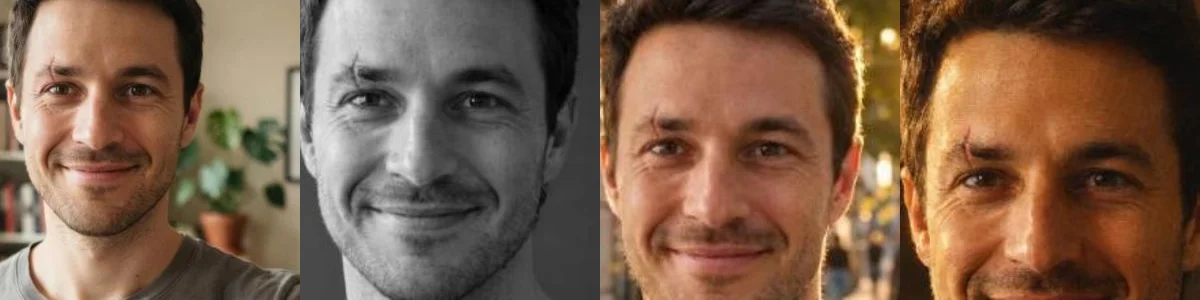
One limit: a generated face is easier for ChatGPT to redraw than a real one, so expect a little more drift with your own selfie.
What are the best studio self-portrait prompts?
Studio prompts work best when you name the backdrop, the light direction and the crop. From here on, each prompt is one to try, built like the tested three. Paste the face-lock line under any that lacks one.
Studio · to try
4. Color studio portrait on a paper backdrop
Using my selfie, make a color studio portrait: plain paper backdrop in [soft beige / sage green / pale blue], large soft light from the front and slightly above, head and shoulders, eye level. Keep my face, skin tone and hairline exactly as in my photo. Natural skin texture, no airbrushing. Keep my own clothes.
What it changes: the background color and the light. It is the closest thing to a portrait session in a photo studio.
Tip: pick a backdrop color that contrasts with your top. A beige top on a beige backdrop makes a flat image.
Studio · to try
5. Low-key portrait with dramatic side light
Turn my selfie into a low-key studio portrait: almost black background, one hard light from my right side so half of my face falls into shadow, a thin rim light on my hair. Head and shoulders, serious expression kept from my photo. Same face shape, eyes, nose, mouth and skin tone. Do not slim or smooth my face.
What it changes: the mood. Deep shadows hide the background and put all the attention on the face.
Tip: side light shows skin texture. If you want a softer result, ask for “a large softbox from the side” instead of “one hard light”.
Which prompts give a natural-light look?
Natural-light prompts look real when they describe a place you could actually be in, with light that comes from somewhere. Window light and open shade are the easiest for the model to get right.
Natural light · to try
6. Window light at home
From my selfie, make a relaxed portrait of me sitting near a large window at home, soft daylight from the side, a few plants and a blurred bookshelf behind me, shot on a 35mm lens at eye level. Keep my face exactly as in my photo, same skin tone and texture. Casual look, keep my own clothes.
What it changes: the room and the light. The aim is a candid photo a friend could have taken.
Tip: describe one or two real objects in the room. A vague “cozy interior” tends to look like a stock photo.
Natural light · to try
7. Travel portrait
Place me in a travel photo: standing on a quiet street in [city or place], late morning, soft overcast light, the street softly blurred behind me, framed from the waist up. Same face, hair and skin tone as in my selfie. Make it look like a real phone photo, not an advertisement.
What it changes: the location and the framing. Overcast light avoids the harsh shadows that make fake backgrounds obvious.
Tip: name a specific place and time of day. “Lisbon side street, late morning” gives a more believable scene than “Europe”.
How do you get a magazine or fashion look?
Ask for the styling, the pose and the setting the way a photo editor would. Keep the face instruction strict, because fashion prompts pull the model toward a model’s face.
Editorial · to try
8. Magazine cover portrait
Turn my selfie into a magazine cover photo: confident pose, three-quarter angle, clean light grey background, crisp beauty lighting, room at the top for a title. Do not add any text. Keep my exact face, skin tone, freckles and hairline. Do not make me thinner, younger or more symmetrical. Style me in a [black turtleneck / tailored blazer].
What it changes: the pose, the styling and the polish. The face should still be yours.
Tip: the “do not add any text” line avoids fake magazine titles. Add your own text later in a photo editor if you want one.
Editorial · to try
9. Street-style fashion photo
From my selfie, make a street-style fashion photo: me walking toward the camera on a city sidewalk, full body, [outfit], natural afternoon light, shallow depth of field, shot on an 85mm lens. Same face, body type and skin tone as in my photo.
What it changes: the whole frame: outfit, body pose and city background.
Tip: a full-body shot asks ChatGPT to invent your body. Add “same body type as in my photo”, and upload a full-length photo if you have one.
Which prompts give a film-camera or movie look?
Name the era, the grain and the colors. Film looks hide small flaws, so they are forgiving if your selfie is not perfect.
Film · to try
10. 1990s 35mm snapshot
Make my selfie look like a 1990s 35mm film snapshot: warm faded colors, visible film grain, slight flash glare, a soft vignette, a casual pose at a backyard party. Keep my face exactly as in my photo. Do not modernize my features or add makeup.
What it changes: the colors, the grain and the setting. The goal is a print from an old photo album.
Tip: for a different decade, swap the era and the props: “1970s, warm brown tones, a wood-paneled living room”.
Film · to try
11. Cinematic movie still
Turn my selfie into a still from a moody drama film: night, neon reflections on a wet street, teal and orange color grade, wide 2.39:1 frame, me in the left third looking off camera. Same face, eyes, nose, mouth and skin tone as in my photo.
What it changes: the color grade, the wide format and the composition.
Tip: “looking off camera” makes it feel like a scene, not a posed portrait. If the face drifts, ask for a closer framing.
Which painting prompts work for a self-portrait?
Name the medium and the paper or canvas. The oil painting is tested prompt 3; here is a softer option.
Painting · to try
12. Loose watercolor portrait
Paint me from my selfie as a loose watercolor portrait on textured white paper: soft washes, a few visible pencil lines, color bleeding at the edges, white background. The face must still look like me: same proportions, eyes, nose and mouth.
What it changes: the medium and the level of detail. Unfinished areas are what make a watercolor read as hand-made.
Tip: watercolor softens features. If you no longer look like yourself, ask for “more detail on the eyes and mouth, looser everywhere else”.
What is a good black-and-white prompt besides the studio one?
Go for strong contrast and a story. The studio black-and-white is tested prompt 1; this one is darker.
Black and white · to try
13. Film noir portrait
Make a black-and-white film noir portrait from my selfie: hard light through window blinds casting stripes across my face, a light haze in the air, deep blacks, 1940s detective mood, head and shoulders. Keep my face exactly as in my photo.
What it changes: the light pattern and the era. The blinds shadow is the signature of the style.
Tip: if the stripes cover your eyes, add “keep my eyes in the light”.
Which prompts turn a selfie into a cartoon or caricature?
Illustration prompts need a clear style and a request to keep you recognizable, because the model is allowed to exaggerate. The caricature prompt comes from a trend TechRadar tried: you upload a photo and ChatGPT adds details from what it remembers about you.
Illustration · to try
14. Caricature of you and your job
Create a caricature of me and my job based on everything you know about me.
What it changes: everything. The trend’s look is a big head, a small body and props drawn from your chats with ChatGPT.
Tip: it works with a fairly close-up photo of your head and upper body. The more ChatGPT remembers about you, the more personal the props.
Illustration · to try
15. 3D animated-film character
Turn my selfie into a 3D animated movie character: big expressive eyes, soft rounded shapes, warm studio lighting, simple colored background. Keep what makes me recognizable: my hairstyle, eyebrows, face shape, skin tone and [glasses / beard / freckles].
What it changes: your face into a cartoon version. The listed features are what keep it yours.
Tip: the bracket is the key. A cartoon keeps likeness through two or three strong details, not through exact proportions.
Illustration · to try
16. Comic-book panel
Draw me from my selfie as a comic-book hero in a single panel: bold ink lines, flat colors, halftone dots, a dynamic low angle, a city skyline behind me. Same face shape, hairstyle and skin tone as in my photo. No speech bubbles, no text.
What it changes: the drawing style and the pose.
Tip: “no text” keeps ChatGPT from adding made-up captions. Ask for a speech bubble with your exact words if you want one.
Can ChatGPT draw you without a photo?
Yes, but it draws what it knows about you, not your face. The viral version of this trend, reported by Tom’s Guide, asks ChatGPT to picture your life from your past chats. The result depends on memory: the more you have used ChatGPT, the more it has to go on. You can see and turn this on or off in Settings > Personalization > Memory.
No photo · to try
17. Draw my life
Based on what you know about me, draw a picture of what you think my current life looks like.
What it changes: nothing about your face: it is a portrait of your interests, as ChatGPT sees them.
Tip: this is the exact wording of the viral prompt Tom’s Guide reported. If the image is generic, ChatGPT probably has little saved about you.
No photo · to try
18. What you think I look like
Based on everything you know about me from our conversations, create a realistic portrait of what you think I look like. Then list, in a few short bullet points, which things you know about me shaped the image.
What it changes: the request from a scene to a face, invented from your chats.
Tip: the second sentence is the interesting part: it shows what ChatGPT remembers about you. Delete any memory you do not want kept.
What about a LinkedIn or work headshot?
Use a dedicated headshot prompt. A work photo needs a neutral background, a business outfit and a face that matches you on a video call, so the rules are stricter than for a creative self-portrait. Our ChatGPT headshot prompt page has the prompt we tested for LinkedIn, with the before and after.
Is it safe to upload your selfie to ChatGPT?
Only upload your own face, or a photo of someone who agreed. If you don’t want your chats used to train OpenAI’s models, turn off Improve the model for everyone in Settings > Data controls, as the OpenAI Help Center explains. A Temporary Chat is not used for training, but it won’t edit your photo: in our test, ChatGPT answered “Image editing is unavailable in this temporary chat” and made no image. Delete the conversation when you are done if you don’t want the photo in your history.
Our take
The prompt matters less than the face-lock line. Our three tested prompts kept the same face across a studio photo, a street portrait and a painting, and the only thing that drifted was one small mark. Start with prompt 1 for a clean profile picture, then try the other styles from your original selfie. If you need a photo for work, go to the headshot page instead. The limit: ChatGPT still exaggerates or erases small details, so check them at full size before you post.
Questions about ChatGPT self-portraits
What is the best ChatGPT prompt for a self-portrait?
One that lists the features to keep and the things that may change. Our black-and-white studio prompt above kept the face recognizable on the first try. For any other style, paste the face-lock line at the end of the prompt and replace the bracket with your own distinctive detail.
Why does ChatGPT change my face?
Image models redraw the whole picture instead of editing pixels. Without clear instructions to keep exact features and not beautify, they drift toward a smoother, younger, more symmetrical face. Naming your face shape, eyes, nose, mouth and one mark, and banning slimming, keeps the result much closer to you.
Can I use a Temporary Chat for my selfie?
No. ChatGPT refused image editing in a Temporary Chat when we tried, with the message “Image editing is unavailable in this temporary chat”. Use a regular chat instead, turn off model training in Data controls if you prefer, and delete the conversation afterwards.
How long does a ChatGPT self-portrait take?
Between 45 and 80 seconds per image in our run, depending on the style. The painting took the longest. Plan a few minutes for a full set, since you will likely send a second version of at least one style to fix a detail.
Can ChatGPT make a self-portrait without a photo?
Yes, from what it remembers about you, but it will not look like you. Prompts like “based on what you know about me, draw a picture of what you think my current life looks like” use ChatGPT’s memory of your chats. With memory off, it has little to go on.
How we tested
On Nov 26, 2026, we uploaded one selfie of a fictional man generated with Google Gemini to ChatGPT in a regular chat on our account, and sent prompts 1 to 3 in order, each from the original photo. We timed each image and compared the faces at full size. Prompts 4 to 18 follow the same pattern and are offered as prompts to try. Privacy settings are taken from the OpenAI Help Center.
More prompts for photos in the AI prompt library, including our old photo restoration prompt. For tools beyond ChatGPT, see best AI for photo editing and our ChatGPT review.
Update log
Nov 26, 2026: page published with three styles tested in ChatGPT.
Nov 29, 2026: expanded to 18 prompts sorted by style, with a reusable face-lock line, the no-photo trend and privacy settings. Prompts 1 to 3 remain the tested ones.