Both apps open a folder of code and put an AI agent next to it, which is why the question keeps coming back. The difference is what you are buying. VS Code is a free editor from Microsoft, and the AI arrives as a GitHub Copilot plan that starts at nothing and costs $10 a month for the first paid seat. Cursor is sold as part of The X Subscription, the bundle that also covers Grok and X, and its first paid seat is $8 a month.
Verdict: stay on VS Code with Copilot Pro at $10 a month if you want the full Microsoft extension catalog, model choice and third-party agents on the cheapest paid tier. Move to Cursor Plus at $8 if you want the agent welded into the app and you are happy with Cursor’s own models, which on that seat means Grok 4.7, Grok 4.6, Grok 4.5 and Composer 2.5. Claude, GPT, Cloud Agents, Automations and Bugbot start at Premium, $30 a month.
The two in one table
| Cursor | VS Code | |
|---|---|---|
| What you are buying | An agent-first desktop app, a CLI and cloud agents, sold as part of The X Subscription. | A free code editor from Microsoft, with AI added through a GitHub Copilot plan. |
| Price of the app | Free tier at $0, then $8, $30, $100 and $200 a month. | $0, no account needed to download. |
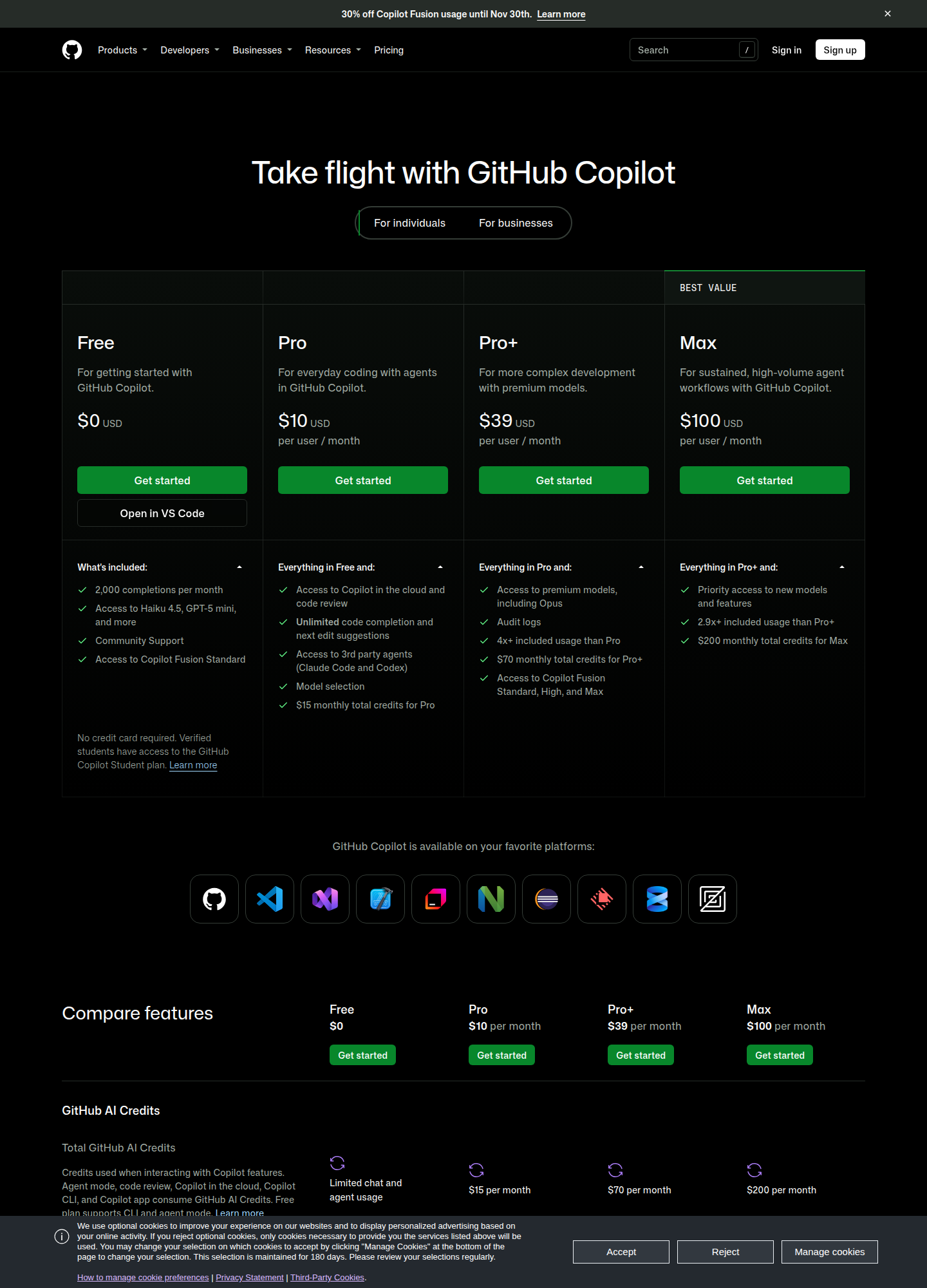
| Price of the AI | Included in the same subscription, from $8 a month. | Copilot Free at $0, Pro at $10 a month, Pro+ at $39, Max at $100. |
| Models on the first paid seat | Cursor models only: Grok 4.7, 4.6, 4.5 and Composer 2.5. | Model selection across the Copilot catalog, plus third-party agents such as Claude Code and Codex. |
| Where the agent runs | In the app, in a terminal through the CLI, or on Cursor’s machines with Cloud Agents from $30. | In the editor, in a terminal through the Copilot CLI, or in the cloud with the Copilot agent. |
| Extensions come from | Open VSX, through Cursor’s own proxy. | The Visual Studio Marketplace. |
| Other editors covered | None. Cursor is its own app, plus a CLI that plugs into other editors. | Visual Studio, JetBrains IDEs, Neovim, Xcode, Eclipse, Zed and more. |
Prices read on November 22, 2026, on cursor.com/pricing and github.com/features/copilot/plans.
What Cursor changes against VS Code
Cursor is not a plugin you install into VS Code. It is a separate app with its own installers for macOS, Windows and Debian or Ubuntu, and the agent sits at the center of the window. Around that app Cursor sells a wider stack: a CLI that runs the same agent from a terminal, Cloud Agents on Cursor’s machines, Automations triggered on a schedule or an event, Bugbot for pull request review, Origin for code hosting, and a mobile app.
The model roster is where the product changed shape. Cursor’s own models, Grok 4.7, Grok 4.6, Grok 4.5 and Composer 2.5, draw from one weekly pool. Claude, GPT and Gemini are reachable from Premium upward, billed at API list price from prepaid credit. On Teams and Enterprise, Cursor Router picks between the two families, and a third-party route carries a Cursor Token Rate of $0.25 per million tokens.
The subscription is the part that surprises people. New customers buy The X Subscription, one plan for Grok, Cursor and X. Plus also carries Grok Chat, Voice, Grok API access and X features such as posting and a higher reply boost. If you never open X, you still pay for it.
VS Code with Copilot against Cursor
The comparison people actually run is Cursor against VS Code plus Copilot, because nobody installs VS Code to work without an assistant. Copilot Free costs nothing and includes 2,000 completions a month with models such as Haiku 4.5 and GPT-5 mini, enough to judge whether an AI editor suits your work. Copilot Pro at $10 adds unlimited completions, next edit suggestions, the cloud agent, code review, model selection and third-party agents including Claude Code and Codex, with $15 of monthly credits behind it.
The cheaper seat is the narrower one. Cursor Plus at $8 does not include third-party models at all: the documentation is explicit that Plus covers Cursor’s own models only, at fixed settings, with Fast off and effort medium. Copilot Pro at $10 includes them from the first request. If your work depends on Claude or GPT, the $8 seat is not the cheaper route, and the real Cursor entry price becomes $30.
VS Code also stopped being a passive editor. Its documentation now carries an Agents window, a plan mode, MCP servers, subagents, custom instructions, agent skills and hooks, nearly the same list Cursor sells, inside the editor the team already has. And VS Code travels: Copilot runs in Visual Studio, JetBrains IDEs, Neovim, Xcode, Eclipse and Zed.
Extensions, marketplace and compatibility
VS Code installs extensions from the Visual Studio Marketplace. Cursor does not use it: its help center states that Cursor uses the Open VSX extension registry, that many popular extensions are available and some are not, or do not work the same way.
The practical consequence is identity. The same publisher and extension name can point to different code on Open VSX than on the Microsoft Marketplace, so an extension ID behaves like a dependency, not like a brand you recognize. Cursor publishes Anysphere builds of some widely used extensions missing from Open VSX, and routes search and downloads through its own proxy with automated malware analysis before an install is offered.
Everything else transfers well. The import brings extensions, themes, settings and keybindings across in one click, Cursor shares VS Code’s default shortcuts, and both apps can run on the same projects. What does not transfer is the guarantee: list the extensions a team depends on and check each one on Open VSX, with the publisher named.
Performance and stability
We did not benchmark either app, so this page carries no timing, no memory figure and no speed claim. What can be checked is how each behaves when it runs out. Cursor’s pool refreshes weekly rather than monthly, so one heavy day does not consume the month, and requests are never downgraded in quality or speed when the pool empties: they pause, wait for the reset, or draw on prepaid credit.
The stability question for Cursor is commercial. The plans changed in 2026: old Pro, Pro+, Ultra and Teams seats still work as legacy plans, and new buyers start on The X Subscription with a different pool structure. A team standardizing on Cursor also standardizes on a price that moved recently. VS Code’s risk sits in the AI layer, where credit allowances have moved too. Neither product is a fixed target, which argues for a quarterly plan review.
What each one costs
VS Code has no price. The bill is the Copilot plan, published per user per month.
| Copilot plan | Price | What it adds | Read on |
|---|---|---|---|
| Free | $0 | 2,000 completions a month, Haiku 4.5 and GPT-5 mini, community support | November 22, 2026 |
| Pro | $10 per user a month | Unlimited completions, cloud agent and code review, third-party agents, $15 of credits | November 22, 2026 |
| Pro+ | $39 per user a month | Premium models including Opus, audit logs, $70 of credits | November 22, 2026 |
| Max | $100 per user a month | Priority access to new models, $200 of credits | November 22, 2026 |
| Business | $19 per user a month | Organization seats, policy and usage controls | November 22, 2026 |
| Enterprise | $39 per user a month | Enterprise seats, the top of the Copilot ladder | November 22, 2026 |
GitHub Enterprise, the repository plan, costs $21 per user a month and now includes Copilot, so a company already paying for it should read the ladder before adding seats.
Cursor sells the app and the AI in one subscription. The page quotes monthly prices and excludes tax; the annual rates are published in the documentation rather than on the pricing page.
| Cursor plan | Monthly | Billed yearly | Read on |
|---|---|---|---|
| Free | $0 | Not published | November 22, 2026 |
| Plus | $8 | $80 a year | November 22, 2026 |
| Premium | $30 | $300 a year | November 22, 2026 |
| Super | $100 | $1,000 a year | November 22, 2026 |
| Ultra | $200 | $2,000 a year | November 22, 2026 |
| Teams | $30, $100 or $200 per seat | Not published | November 22, 2026 |
| Enterprise | Custom quote | Custom quote | November 22, 2026 |
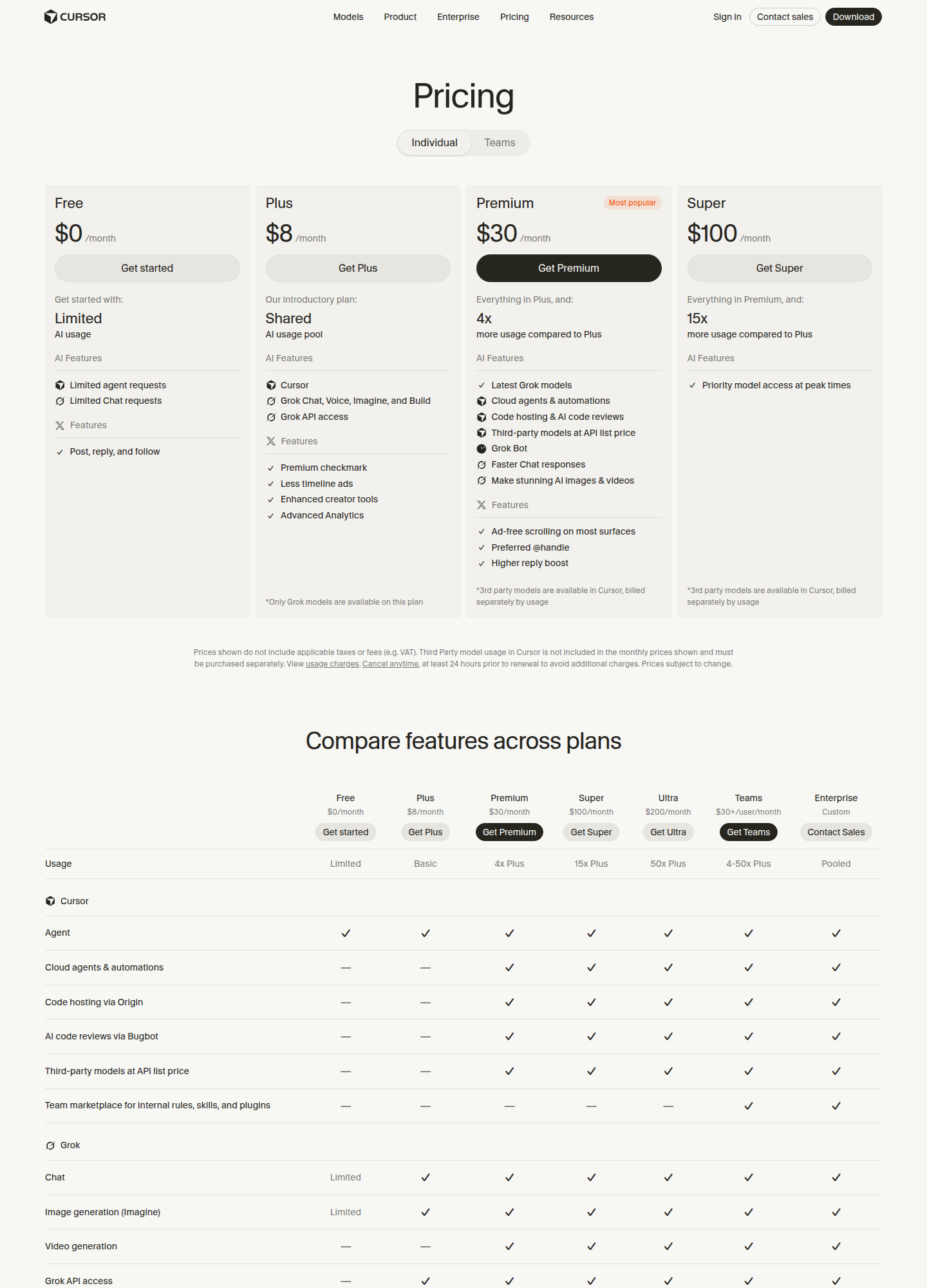
Twelve monthly payments come to $96 on Plus, $360 on Premium, $1,200 on Super and $2,400 on Ultra, so the yearly rate saves $16, $60, $200 and $400, our calculation against the published annual totals. The comparison that decides most buyers is $120 a year for VS Code with Copilot Pro against $96 for Cursor Plus paid monthly, or $80 paid yearly. Cursor at $30 costs $360 a year, three times the Copilot seat, for cloud agents rather than for a model.
Moving your setup over
Install Cursor, open Settings with Cmd+Shift+J on macOS or Ctrl+Shift+J elsewhere, go to General then Account, and use the VS Code Import button to bring over extensions, themes, settings and keybindings. The shortcuts you already know still work because the defaults are the same.
Two things to plan around: the extensions that only live on the Microsoft Marketplace, and the AI bill. Run the extension audit before moving a team, and keep both apps installed for a month. Plus leaves out third-party models, Cloud Agents, Automations, Bugbot and personal API keys. The day you need any of those, the plan is Premium at $30.
Who should pick which
Stay on VS Code with Copilot if the team already deploys it, if anyone codes in JetBrains, Xcode or Neovim, if the work depends on Claude or GPT from the first request, or if your extensions are Microsoft-marketplace only. At $10 a seat with third-party agents included, it is the conservative purchase.
Choose Cursor if the agent is the reason you open the editor, if one person, one repository and Cursor’s own models cover the work, and if Cloud Agents, Automations or Bugbot are on the roadmap, because those arrive at $30. It also suits someone already paying for Grok or X, since the subscription covers all three.
The verdict
For most developers the $10 Copilot Pro seat is the better purchase in 2026: it keeps the Microsoft catalog, adds third-party agents and model choice, and leaves the editor where the team works. Cursor Plus at $8 is the better purchase for one buyer, the solo developer who wants the agent at the center of the app, will work on Grok and Composer models without complaint, and expects to pay $30 once cloud agents matter. Neither price is the whole bill: the extension audit and the plan you need decide it.
Frequently asked questions
Should you switch from VS Code to Cursor? Only if the agent is the main reason you are in the editor. For conventional coding with an assistant, Copilot Pro at $10 keeps the catalog and the editor.
Is Cursor better than VS Code? It is better at one job, running an agent inside the app. It is worse at extension coverage, model choice on the cheap seat and working outside its own app.
Do VS Code extensions work in Cursor? Many do, not all. Cursor installs from Open VSX, and its help center warns that some extensions are missing or behave differently. Check each extension ID there first.
Is VS Code free? Yes. The editor costs nothing, and Copilot Free at $0 covers 2,000 completions a month. The first paid seat is Pro at $10.
Does Cursor include Claude or GPT? Not on Free or Plus, which run Cursor’s own models. Claude, GPT and Gemini arrive at Premium, $30 a month, billed at API list price from prepaid credit.
Is anyone still using VS Code? Yes, it remains Microsoft’s main editor and the Copilot agent stack ships there first. Both apps also run side by side on the same projects, the cheapest way to test a switch.
Sources
https://cursor.com/pricing (read November 22, 2026; monthly view, plan feature comparison)
https://cursor.com/docs/models-and-pricing (read November 22, 2026; annual rates, weekly pool, third-party model rules)
https://cursor.com/help/getting-started/migrate-vscode (read November 22, 2026; Open VSX statement, import steps)
https://cursor.com/help/customization/extensions (read November 22, 2026; registry proxy, Anysphere builds, team controls)
https://github.com/features/copilot/plans (read November 22, 2026; Free, Pro, Pro+, Max, Business, Enterprise)
https://github.com/pricing (read November 22, 2026; GitHub Enterprise at $21 with Copilot access)
https://code.visualstudio.com/docs/configure/extensions/extension-marketplace (read November 22, 2026; Microsoft marketplace)
Update log. November 22, 2026: page published. Every price read the same day on the publisher’s own page, monthly view for both tools, annual totals from Cursor’s documentation. No price was converted and no speed or memory figure is claimed.
More comparisons and coding tools
Our full Cursor review walks the whole stack, the Cursor vs Claude Code comparison covers the terminal route instead of the editor, and Cursor alternatives lists what else does the same job. The build and data hub carries every coding tool we have priced, the Cursor pricing page breaks down every seat, Cursor deals tracks the current offer, and all our head-to-head pages sit on one page.