


Neural Minute may earn a commission if you buy through our links. It doesn’t change our verdicts. How we test · How we make money
To train your team in AI, pick three tasks they do every week, practice them in pairs for four weeks, and measure time, errors and autonomy before and after. The plan takes each person about six and a half hours. The agenda, the scorecard and the week 1 rules are below, free to download.
This plan is built from published research and official guidance, all linked in the sources. The marketing team in the scorecard is an example we made up to show how the sheet works.
What does a four-week AI training plan look like?
It is four short weeks with one job each: measure, learn the first task, add two more, measure again. Nobody leaves their desk for a course. The team practices on work that is already due.
| Week | Goal | Sessions | Time per person | What you have on Friday |
|---|---|---|---|---|
| 1. Baseline | Set the rules and measure how the three tasks go today | Kickoff, peer review, check-in | 1 h 45 | Rules acknowledged, week 1 columns of the scorecard filled |
| 2. First task | Learn one task well, in pairs | Workshop, pair session, share-out | 1 h 50 | A team prompt for task A that has already been improved once |
| 3. Two more tasks | Practice checking AI answers, add tasks B and C | Workshop, pair session, share-out | 1 h 35 | A shared library of three prompts and a list of cases AI gets wrong |
| 4. Measure | Run the three tasks alone with AI and compare | Peer review, autonomy check, review | 1 h 25 | A keep, adjust or drop decision for each task |
That adds up to 6 hours 35 minutes per person over the month. For the manager of a six-person team, it is about 8 hours, including 90 minutes of preparation before week 1.
- Download the four-week agenda (CSV): every session with its length, who attends, what happens and what comes out of it.
- Download the blank scorecard (CSV): one row per person and per task, for weeks 1 and 4.
- Download the filled example (CSV): the made-up marketing team shown further down.
All three files open in Google Sheets, Excel or Numbers.
How do you pick the three tasks?
Pick tasks the team already does at least once a week, that produce a written result, and that a colleague can check in ten minutes. If a task fails one of these three tests, it will be hard to practice and hard to measure.
- Weekly or more. Each person does the task at least three times in the month: once for the baseline, once in a pair session, once for the final measure.
- A written result. A recap, a first draft, a reply, a summary, a list. AI chat tools are built for text, and text is easy to review.
- Safe material. The task must be doable without pasting anything on the never-paste list below. If it needs customer records or contracts, pick another task for now.
- Different shapes. Take one task that summarizes numbers or notes, one that drafts from scratch, and one that reworks existing text. You will see where AI helps and where it hurts.
Ask the team to name the tasks. A five-minute question in a meeting works: “Which weekly task would you hand off first?” People practice harder on a chore they chose.
If part of your team has never opened an AI chat tool, send them one short lesson from our list of free AI courses before the kickoff. Thirty minutes is enough to follow week 1.
What happens each week?
Each week has two or three short sessions with a named result. The times below are training time on top of normal work. The timed runs in weeks 1 and 4 are tasks the team does anyway.
Before week 1: 90 minutes of manager prep
Name the three tasks. Choose the one AI account the team will use. Write the rules on one page. Create the scorecard with one row per person and per task. Then form pairs: put someone who already uses AI with someone who does not. With an odd number, make one group of three.
Week 1: set the rules and measure the starting point
| Session | Time | Who | What happens | Deliverable |
|---|---|---|---|---|
| Kickoff Monday | 60 min | Whole team, manager leads | Why the team is doing this. The three tasks. Rules read aloud and acknowledged. Pairs announced. How to time a task and count errors. | Rules acknowledged by each person; list of pairs |
| Baseline run Tuesday to Thursday | Normal work, timed | Each person, alone | Do each of the three tasks once, the way you do it today, with a timer on. This is normal work, only timed. | week1_minutes filled for every row |
| Peer review Tuesday to Thursday | 30 min | Pairs | Your partner reviews your three finished pieces (10 minutes each) and counts the errors. | week1_errors filled for every row |
| Check-in Friday | 15 min | Whole team, manager leads | Manager checks the sheet is complete. Each person rates their autonomy from 1 to 4 for each task; manager adjusts if needed. | Week 1 columns complete |
The baseline is the task done the way each person does it today. If someone already uses AI for it, that is their baseline. Do not skip this week: without it, you will have opinions in week 4 and no numbers.
Week 2: learn one task well
| Session | Time | Who | What happens | Deliverable |
|---|---|---|---|---|
| Workshop 1 Monday | 45 min | Whole team, manager leads | Build the Task A prompt live on a real example. Check the answer together against the source material. | Task A prompt v1 saved in a shared doc |
| Pair session 1 Wednesday | 45 min | Pairs, manager walks around | Task A on this week’s real work. One person drives, the other checks, swap halfway. Draft the Task B prompt. | One real Task A piece per person; Task B prompt v1 |
| Share-out Friday | 20 min | Whole team | Each pair shows one piece of work and one error it caught. | Task A prompt v2; list of errors caught |
One person “drives” (types the prompt, edits the answer) and the other checks every fact against the source material. They swap halfway. The checker role is the one that builds the habit you want.
Week 3: add two tasks and practice checking
| Session | Time | Who | What happens | Deliverable |
|---|---|---|---|---|
| Workshop 2 Monday | 30 min | Whole team, manager leads | Fact-check drill: take one AI answer on Task B and find every error against the source. Then build the Task C prompt. | Team checklist of what to verify; Task C prompt v1 |
| Pair session 2 Wednesday | 45 min | New pairs, manager walks around | Tasks B and C on real work. Same rule: one drives, one checks, swap. | One real Task B and Task C piece per person |
| Share-out Friday | 20 min | Whole team | Each pair shows its best prompt change and one case where AI did worse than a person. | Shared library with three prompts; list of cases AI gets wrong |
Change the pairs this week so prompts and tricks travel across the team. The reviewer for the scorecard stays the same person as in week 1, so the error counts stay comparable.
Week 4: measure again and decide
| Session | Time | Who | What happens | Deliverable |
|---|---|---|---|---|
| Measured run Monday to Wednesday | Normal work, timed | Each person, alone | Do each of the three tasks once with AI and the team prompt, timer on. Checking time counts. | week4_minutes filled for every row |
| Peer review Monday to Wednesday | 30 min | Same reviewer as week 1 | The week 1 reviewer reviews the three finished pieces and counts the errors the same way. | week4_errors filled for every row |
| Autonomy check Thursday | 10 min | Manager with each person | The person explains how they did one task and how they checked it. Manager and person agree on a level from 1 to 4 per task. | week4_autonomy filled for every row |
| Review Friday | 45 min | Whole team, manager leads | Compare week 1 and week 4 per task. Decide keep, adjust or drop for each task. Pick the next task. | Decision per task; next task and start date |
For teams above 12 people, run the workshops in two groups and split the autonomy checks with a team lead. The rest of the plan does not change.
How do you measure progress in weeks 1 and 4?
Measure three things per person and per task: minutes spent, errors found by a reviewer, and an autonomy level from 1 to 4. Time alone is misleading. A task done twice as fast with wrong figures in it is not a win.
- Minutes. From opening the task to “ready for review.” In week 4, writing the prompt and checking the answer count.
- Errors. The reviewer counts each problem in the finished piece: a wrong fact, number, name, date or link; a required element that is missing; a passage that has to be rewritten. One problem counts as 1.
- Autonomy. How far the person can go alone with AI on this task, on the scale below.
| Level | Name | What it looks like on this task |
|---|---|---|
| 1 | Guided | Needs someone next to them at every step to do the task with AI. |
| 2 | Assisted | Does the task with the team prompt, but needs help to fix a weak answer or to check it. |
| 3 | Independent | Does the task alone with the team prompt and catches the errors before the reviewer does. |
| 4 | Coach | Adapts the prompt to new cases and can teach the task to a teammate. |
On the Friday of week 4, read the scorecard task by task and apply one rule:
- Keep if time is down and errors are not up. The team prompt becomes the standard way to do the task.
- Adjust if time is down but errors are up. Add a checking step to the prompt or the routine, then measure again two weeks later.
- Drop if time is flat or up. Some tasks are faster by hand. Write that down and move on.
A realistic target for autonomy is everyone at level 3 on at least one task, and one person at level 4 per task. That person becomes the go-to for new hires.
What does a filled scorecard look like?
Here is the sheet filled in for an example: a six-person marketing team we made up, with three weekly tasks. The numbers are ours, chosen to show how to read the sheet. They are not results from a real team.
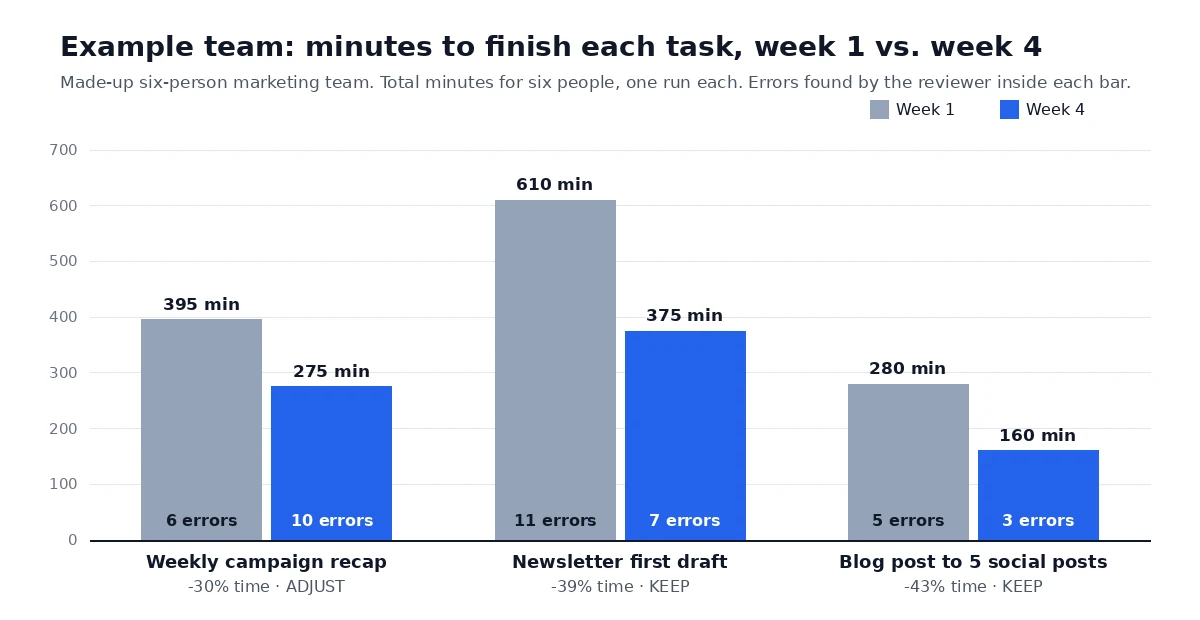
| Task (example) | Minutes, week 1 | Minutes, week 4 | Change | Errors, week 1 | Errors, week 4 | People at level 3 or 4 | Decision |
|---|---|---|---|---|---|---|---|
| Weekly campaign recap | 395 | 275 | -30% | 6 | 10 | 0 of 6, then 3 of 6 | Adjust |
| Newsletter first draft | 610 | 375 | -39% | 11 | 7 | 0 of 6, then 4 of 6 | Keep |
| Blog post to 5 social posts | 280 | 160 | -43% | 5 | 3 | 1 of 6, then 6 of 6 | Keep |
| All three tasks | 1,285 | 810 | -37% | 22 | 20 |
Totals for six people, one run of each task per week. Example data.
How to read it:
- Newsletter first draft and social posts: keep. Time is down and errors are down. The prompts go into the shared library as the standard.
- Weekly campaign recap: adjust. The team saved 120 minutes, but the reviewers found 10 errors where they had found 6. The AI answers contained figures that were not in the export. The fix is a rule in the prompt (“use only the numbers I paste”) and a line-by-line check of every figure before review.
- One person got slower. Luis took 85 minutes on the recap with AI, against 80 without. He stays paired on that task for two more weeks.
The full sheet has one row per person and per task. That is 18 rows for this team:
| Person | Task | Reviewer | Min. W1 | Errors W1 | Level W1 | Min. W4 | Errors W4 | Level W4 | Min. saved |
|---|---|---|---|---|---|---|---|---|---|
| Maya | Weekly campaign recap | Tom | 50 | 0 | 2 | 30 | 1 | 3 | 20 |
| Maya | Newsletter first draft | Tom | 90 | 1 | 2 | 50 | 1 | 4 | 40 |
| Maya | Blog post to 5 social posts | Tom | 40 | 0 | 2 | 20 | 0 | 4 | 20 |
| Devon | Weekly campaign recap | Luis | 60 | 1 | 1 | 35 | 2 | 3 | 25 |
| Devon | Newsletter first draft | Luis | 75 | 1 | 2 | 40 | 0 | 4 | 35 |
| Devon | Blog post to 5 social posts | Luis | 45 | 1 | 1 | 25 | 1 | 3 | 20 |
| Priya | Weekly campaign recap | Hannah | 70 | 1 | 1 | 45 | 1 | 2 | 25 |
| Priya | Newsletter first draft | Hannah | 100 | 2 | 1 | 60 | 1 | 3 | 40 |
| Priya | Blog post to 5 social posts | Hannah | 30 | 0 | 3 | 20 | 0 | 4 | 10 |
| Luis | Weekly campaign recap | Devon | 80 | 2 | 1 | 85 | 3 | 2 | -5 |
| Luis | Newsletter first draft | Devon | 120 | 3 | 1 | 85 | 2 | 2 | 35 |
| Luis | Blog post to 5 social posts | Devon | 60 | 1 | 1 | 35 | 1 | 3 | 25 |
| Hannah | Weekly campaign recap | Priya | 45 | 0 | 2 | 25 | 0 | 4 | 20 |
| Hannah | Newsletter first draft | Priya | 95 | 1 | 1 | 60 | 1 | 3 | 35 |
| Hannah | Blog post to 5 social posts | Priya | 50 | 1 | 1 | 30 | 0 | 3 | 20 |
| Tom | Weekly campaign recap | Maya | 90 | 2 | 1 | 55 | 3 | 2 | 35 |
| Tom | Newsletter first draft | Maya | 130 | 3 | 1 | 80 | 2 | 2 | 50 |
| Tom | Blog post to 5 social posts | Maya | 55 | 2 | 1 | 30 | 1 | 3 | 25 |
Example data for a made-up team. W1 is week 1, W4 is week 4. Levels are the autonomy levels 1 to 4 defined above.
Which rules should you set in week 1?
Set five rules at the kickoff, on one page, and have each person acknowledge them: which account to use, what never to paste, how to check facts, who owns the result, and what to do after a mistake. The U.S. Department of Labor’s AI Literacy Framework lists “protecting sensitive information” and “maintaining accountability” among the basics every worker needs.
Rule 1: use the team’s work account, not a personal one
Work plans and personal plans treat your data differently. In Microsoft and LinkedIn’s 2024 Work Trend Index, 78% of AI users brought their own AI tools to work, and 80% at small and medium-sized companies. Your team is probably doing it already. Pick one tool and one plan, and say so on day one.
| Tool | On a work plan | On a personal plan |
|---|---|---|
| ChatGPT | Business, Enterprise and Edu: business data is not used for training by default, and you own your inputs and outputs. | Chats can be used for training until you turn it off: Settings, Data controls, “Improve the model for everyone,” off. The setting follows your account on web and mobile. |
| Claude | Claude for Work and the API: inputs and outputs are not used for training by default. Feedback you send is the exception. | Free, Pro and Max: chats can be used when the model improvement setting is on. Turn it off under Settings, Privacy. Incognito chats are never used. |
| Gemini | Qualifying Google Workspace editions: prompts are customer data, not used to train models without your permission and not read by human reviewers. | Human reviewers read some chats, and reviewed chats are kept for up to three years. Google’s own privacy notice asks you not to enter confidential information. |
Privacy terms checked in November 2026.
If you cannot pay for a work plan yet, have everyone change the personal setting during the kickoff, on screen, together. Our guides on ChatGPT’s privacy settings and on whether Claude trains on your data show each step. For help choosing a plan, see our picks of the best AI tools for small business.
Rule 2: the never-paste list
Some data stays out of AI tools on any plan. NIST’s generative AI risk profile names the risk plainly: leakage and unauthorized use or disclosure of personal or sensitive data. Print this list and keep it next to the screen:
- Passwords, API keys and two-factor codes.
- Customer personal data: names tied to emails, phone numbers, addresses, order histories.
- Social Security numbers, card numbers, bank details and copies of IDs.
- Health information about anyone.
- HR records: pay, reviews, complaints, applications.
- Contracts, anything under an NDA, and unreleased financial results.
The quick test: if you would not email it to a stranger outside the company, do not paste it. When a task needs a real case, replace the names with labels such as “Customer A” before you paste.
Rule 3: check every fact before it leaves the team
AI tools produce wrong content that sounds right. NIST calls this confabulation: “confidently stated but erroneous or false content.” So every number, name, date, quote and link in an AI answer gets checked against the source before a client or a boss sees it. In pairs, the checker does it. Alone, you do it.
Rule 4: the person who sends it owns it
“The AI wrote that” is not an answer. The person who sends a piece of work is responsible for it, whatever tool helped. Decisions about people (hiring, pay, discipline) are never made by pasting a question into a chatbot.
Rule 5: report a slip the same day, with no blame
If someone pastes something from the never-paste list, they tell you the same day. You delete the chat and note what happened. No blame: people who fear a penalty hide mistakes. NIST’s AI Risk Management Framework playbook asks for the same two things: staff trained on the organization’s AI policies, and a way for them to acknowledge their role.
Which prompt do you start with in week 2?
Start with one template that the whole team fills in for each task. It gives the AI the context, limits it to the material you paste, and makes it list what you need to check. Build the task A version together in Workshop 1, then save it in a shared doc.
Team task prompt · fill in the brackets
You are helping a [your role] at a [type of company].

Task: [what you need, for example a one-page recap of last week’s campaign results].
Reader: [who reads it and what they will decide with it].
Format: [length, sections, tone].

Use only the source material I paste below. If a number, name or date is not in it, write [MISSING]. Do not guess.

Here is a past version we were happy with, as a model: [paste it, with names removed].

Before you write, ask me up to three questions if anything is unclear.
After your answer, list every number, name and date you used, so I can check each one against the source.

Source material:
[paste here]
The last two lines matter most. Questions first stops the AI from guessing what you meant. The list of numbers, names and dates turns fact-checking into a short checklist.
What happened when we ran it
We filled the template for a weekly campaign recap and pasted an invented export: 10 ad sets for a made-up furniture store, with one purchase count left blank on purpose, and a request for revenue the export does not contain (download the test export). We ran it in ChatGPT, in a temporary chat.
- It asked first. Before writing, ChatGPT asked three questions: the missing purchase count, the missing revenue, and whether to rank ad sets by cost per purchase or by volume.
- It did not guess. Once we answered “not available”, both gaps came back as [MISSING].
- The math held. We checked every figure against the export: $2,295 spent, 9,350 clicks, 350 add-to-carts, 49 confirmed purchases, and the cost per purchase of each ad set were all correct.
- The check list arrived as asked: a table of every number, name and date with where it came from.
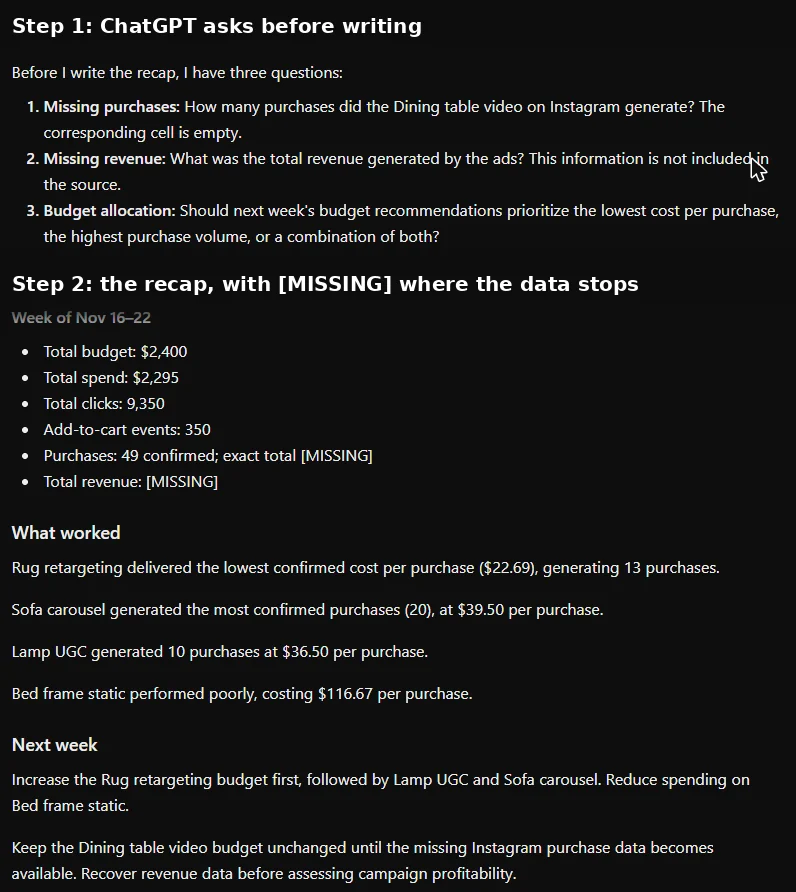
One run on invented data is a demonstration, not a guarantee. Keep the checker step in week 2 even when the first answers look right.
Why train in pairs on real tasks, and not with a course?
Because the research points the same way: people use AI at work when they have had enough hands-on training, with someone to coach them, on tasks that look like their job. A course gives vocabulary. It does not change how Tuesday’s report gets written.
- Hours and coaching count. In BCG’s AI at Work 2025 survey of more than 10,600 people in 11 countries and regions, only one-third said they had been properly trained. Regular use was sharply higher among people with at least five hours of training and access to in-person training and coaching. This plan gives each person more than six hours, all of it live, including two and a half hours in pairs.
- Most people are left alone. In the 2024 Work Trend Index (31,000 people in 31 markets), only 39% of people who used AI at work had received AI training from their company.
- AI helps on some tasks and hurts on others. In a Harvard Business School experiment with 758 Boston Consulting Group consultants, people using AI completed 12.2% more tasks and finished them 25.1% faster on tasks AI handles well. On a task chosen to be beyond what AI does well, they were 19 percentage points less likely to get the right answer. That is why the scorecard counts errors and why “drop” is a normal result.
- Practice on real work is the official advice too. The Department of Labor’s framework, published in February 2026, puts hands-on use on real tasks first among its delivery principles, and recommends comparing AI work side by side with human work. Weeks 1 and 4 do exactly that.
The same framework is a handy checklist for AI literacy training. It names five content areas, and each one has a place in the four weeks:
| Content area in the framework | Where the plan covers it |
|---|---|
| Understand AI principles | Kickoff in week 1, plus a short free course for beginners |
| Explore AI uses | Choosing the three tasks; share-outs on Fridays |
| Direct AI effectively | Workshops 1 and 2, the team prompt, pair sessions |
| Evaluate AI outputs | The checker role in pairs, the fact-check drill in week 3, the error count |
| Use AI responsibly | The five rules, set and acknowledged in week 1 |
What do you do after week 4?
Start the next cycle with one new task, and keep a light routine so the habits last. The month gave you a method. Reuse it.
- One new task per month. Baseline it, practice it in pairs for two weeks, measure it. The scorecard just gets more rows.
- Re-measure every “adjust” task two weeks after the fix. If errors are still up, drop it.
- A 20-minute share-out each month. One prompt that improved, one case where AI got it wrong.
- New hires pair with a level 4. They learn the three prompts and the five rules in their first week.
- Review the bill. Once you know which tasks stay, cut the seats and tools nobody uses. Our guide on how to reduce AI tool costs has an audit sheet for that.
More step-by-step guides are in our Learn AI hub.
Our take
For a team of 5 to 30 people with no training department, this is the plan we would run: three real tasks, pairs, and a scorecard filled in twice. It suits office teams whose work is mostly writing, summarizing and reporting. One limit: the plan comes from the research and official guidance linked below, not from a team we followed. Your week 4 numbers are the proof that counts.
Questions about training a team in AI
How long does it take to train a team in AI? Four weeks is enough to get a team working alone on three everyday tasks. In this plan each person spends 6 hours 35 minutes in sessions, spread over the month, and the manager about 8 hours for a team of six. Getting good at new tasks continues after that, one task per month.
Can you train your team in AI for free? Yes, apart from the time. The plan, the agenda and the scorecard cost nothing, and the free versions of the main chat tools are enough to practice once everyone has turned off training in the settings (rule 1). A paid work plan becomes worth it when the tasks involve company information, because work plans do not use your data for training by default.
How do you close AI skill gaps in a team? Pair people across the gap and measure it. Put someone at autonomy level 3 or 4 with someone at level 1 or 2 on a real task, have them swap roles, and rate each person again after four weeks. The scorecard shows who still needs a partner and on which task.
What is AI literacy training? It is training that gives every worker the basics to use and judge AI tools responsibly. The U.S. Department of Labor defines AI literacy as a foundational set of competencies to use and evaluate AI, with a focus on generative AI. In practice: how the tools work, what to ask, how to check answers, and what never to share.
What should employees never put into AI tools? Passwords and API keys, customer personal data, Social Security and card numbers, health information, HR records, contracts and anything under an NDA. A simple test works for the rest: if you would not email it to a stranger outside the company, do not paste it into a chatbot.
Should AI training be mandatory? The rules session should be: everyone who can open an AI tool at work needs to know which account to use and what never to paste. For the practice weeks, include the whole team but let people choose the tasks. Training works better on a chore people picked themselves.
Sources
- U.S. Department of Labor, AI Literacy Framework, Training and Employment Notice 07-25, February 13, 2026.
- NIST, AI Risk Management Framework: Generative AI Profile (NIST AI 600-1), July 2024, and the AI RMF Playbook, Govern 2.2.
- BCG, AI at Work 2025: Momentum Builds, but Gaps Remain, June 2025.
- Microsoft and LinkedIn, 2024 Work Trend Index Annual Report, May 2024.
- Dell’Acqua and others, Navigating the Jagged Technological Frontier, Harvard Business School Working Paper 24-013, September 2023.
- Privacy pages of OpenAI, Anthropic and Google, linked in the account table above.
Update log
Nov 28, 2026: guide published with the four-week agenda, the scorecard and the example team.