


Neural Minute may earn a commission if you buy through our links. It doesn’t change our verdicts. How we test · How we make money
This ChatGPT cheat sheet fits on one page: a 5-part prompt structure, 15 fill-in prompt formulas, 7 checks for any answer and the shortcuts OpenAI documents. Download the PDF, print it on US Letter paper and keep it next to your keyboard. Everything on it is also on this page, with three worked exercises.
One page, US Letter, free, no sign-up. Features and shortcuts checked against the OpenAI Help Center on Nov 26, 2026.
What is on the ChatGPT cheat sheet?
The sheet has seven numbered blocks, ordered the way you write a prompt: build it, add context, set the format, pick a formula, check the answer. The last two blocks cover shortcuts and common mistakes. It is plain black and white, so it prints cleanly on any home printer.
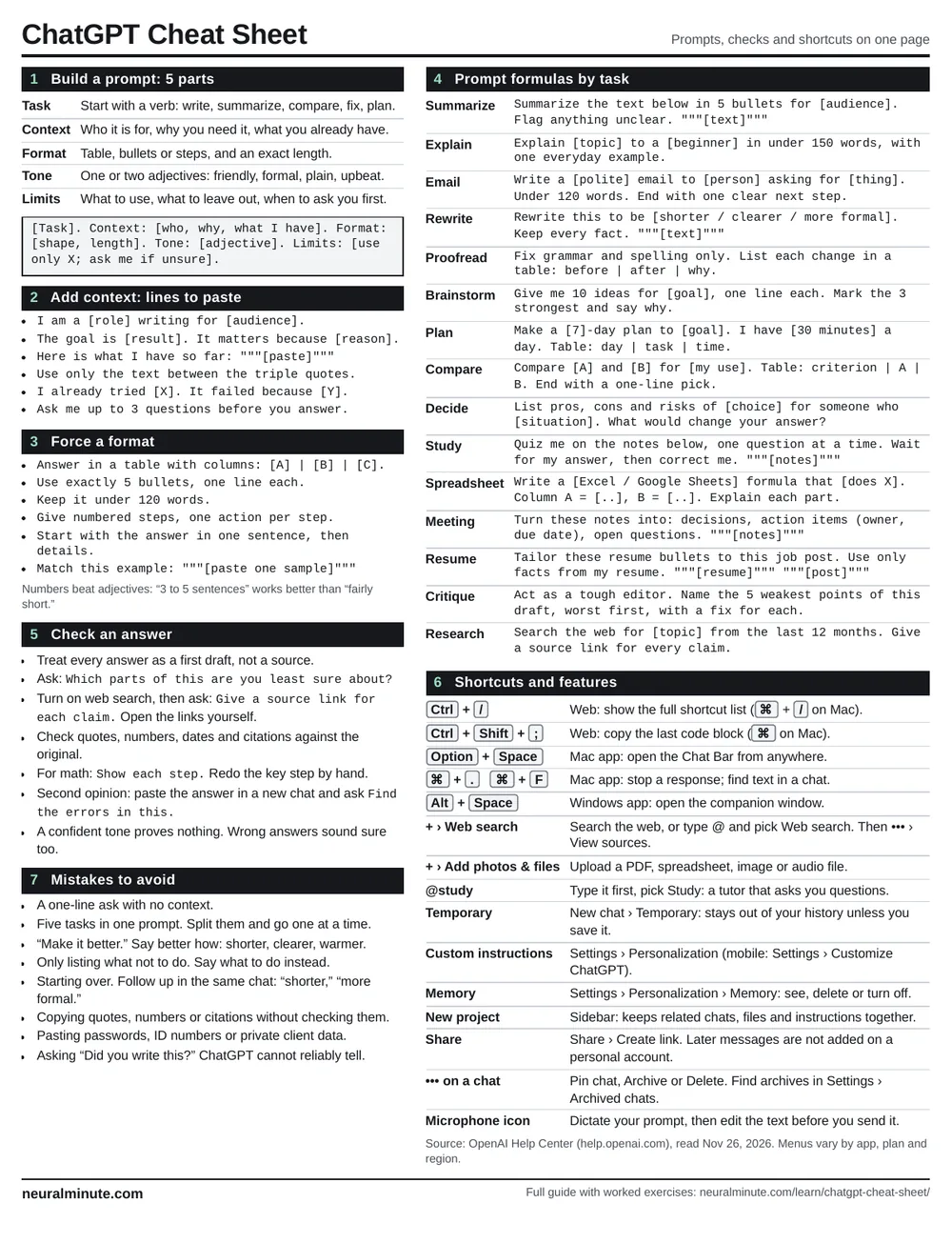
| Block | What you get | Use it when |
|---|---|---|
| 1. Build a prompt | 5 parts and a fill-in skeleton | You start from a blank box |
| 2. Add context | 6 lines to paste | The answer is generic |
| 3. Force a format | 6 format instructions | The answer is a wall of text |
| 4. Prompt formulas | 15 formulas by task | You need a fast start |
| 5. Check an answer | 7 checks | You plan to reuse the answer |
| 6. Shortcuts and features | 16 shortcuts and menu paths | You want to work faster |
| 7. Mistakes to avoid | 8 habits to drop | Results keep disappointing you |
New to chatbots? Start with block 1 only. If words like “prompt” or “hallucination” are new to you, our AI glossary explains them in one line each.
How do you use the cheat sheet?
Use it as a checklist before you press Enter, not as a script. Write your request the way you normally would, then run down block 1 and add what is missing. Most weak prompts miss two things: context and format.
- Print it or pin it. Print the PDF at 100% scale on US Letter paper, or keep it open in a browser tab.
- Write your first draft prompt. One sentence is fine at this stage.
- Add the missing parts. Look at block 1. Add who the answer is for, the shape you want and any limit.
- Or grab a formula. For a common task, copy a line from block 4 and replace the words in square brackets.
- Follow up, don’t restart. If the answer is close, reply in the same chat: “shorter,” “more formal,” “add an example.”
- Check before you reuse. Run block 5 on anything you will send, publish or act on.
A free ChatGPT account is enough to practice. Open ChatGPT in another tab and try the exercises as you read.
What are the 5 parts of a good ChatGPT prompt?
A good prompt has five parts: the task, the context, the format, the tone and the limits. You don’t need all five every time. A quick question needs only the task. Anything you will reuse deserves at least the first three.
| Part | What to write | Example |
|---|---|---|
| Task | Start with a verb: write, summarize, compare, fix, plan | Write a thank-you note |
| Context | Who it is for, why you need it, what you already have | for a recruiter who interviewed me yesterday for a nursing job |
| Format | Table, bullets or steps, and an exact length | in 4 sentences |
| Tone | One or two adjectives | warm and professional |
| Limits | What to use, what to leave out, when to ask you first | Don’t invent details. Ask me what we discussed first. |
This structure follows OpenAI’s own advice: be clear and specific, give enough context, name the tone you want and refine in steps (prompt engineering best practices for ChatGPT).
The fill-in skeleton
[Task].
Context: [who it is for, why I need it, what I already have].
Format: [table, bullets or steps] in [length].
Tone: [one or two adjectives].
Limits: [use only what I give you; ask me if anything is unclear].
How do you add context to a prompt?
Add one line each for who you are, who the answer is for and what you already have. ChatGPT knows nothing about your situation until you type it. A request like “do this task for me” gives it nothing to work with.
| Line to paste | What it fixes |
|---|---|
| I am a [role] writing for [audience]. | Wrong level, wrong vocabulary |
| The goal is [result]. It matters because [reason]. | An answer that misses the point |
| Here is what I have so far: """[paste]""" | Generic text that ignores your draft |
| Use only the text between the triple quotes. | Invented details |
| I already tried [X]. It failed because [Y]. | Advice you have heard before |
| Ask me up to 3 questions before you answer. | Guesses about what you want |
The triple quotes are a simple fence. They show where your pasted text starts and stops, so the instruction and the material don’t blur together.
Exercise 1: add context
This is a practice case we wrote. The weak prompt:
Write an email asking for a refund.
What is missing: who you are writing to, what you bought, what went wrong, what you want and by when. ChatGPT will fill those gaps with placeholders or made-up details. Try to fix it before you read on.
Corrected prompt
Write an email asking for a refund.
Context: I bought a blender from an online store 10 days ago. It arrived with a cracked jar. The store's policy allows returns within 30 days. I want a full refund, not a replacement.
Format: under 120 words, with a subject line.
Tone: polite and firm.
Limits: leave [order number] as a placeholder. Don't invent any other detail.
How to grade your version: it passes if a stranger could write the email from your prompt alone, without asking you anything. Count the facts: product, problem, date, policy, the result you want. Five facts in, five facts out.
How do you make ChatGPT answer in the format you want?
Name the shape and the size: a table with set columns, a number of bullets, a word limit. Numbers work better than adjectives. “3 to 5 sentences” is clear. “Fairly short” is not.
| Format instruction | Best for |
|---|---|
| Answer in a table with columns: [A] | [B] | [C]. | Comparisons, plans, lists with attributes |
| Use exactly 5 bullets, one line each. | Summaries you will skim |
| Keep it under 120 words. | Emails, posts, intros |
| Give numbered steps, one action per step. | How-to answers |
| Start with the answer in one sentence, then details. | Questions where you want the verdict first |
| Match this example: """[paste one sample]""" | Copying a style or a layout you already use |
The last line is the strongest. One pasted sample tells ChatGPT more about the layout you want than a paragraph of description.
Exercise 2: force a format
Another practice case. You paste a page of meeting notes and type:
Summarize these notes.
What is missing: the shape and the limits. ChatGPT picks its own layout and fills the gaps on its own. Decide what you need to pull out of the notes and what it must not guess, then ask for exactly that.
Corrected prompt
Summarize the meeting notes below.
Format:
1. Decisions: up to 5 bullets, one line each.
2. Action items: a table with columns Task | Owner | Due date.
3. Open questions: up to 3 bullets.
Limits: use only the notes between the triple quotes. If an owner or a date is missing, write "not stated" instead of guessing.
"""[paste your notes]"""
How to grade your version: it passes if you named the sections, set a size for each and said what to do when information is missing. That last rule matters most. Without it, an empty “Owner” cell tends to get a plausible name.
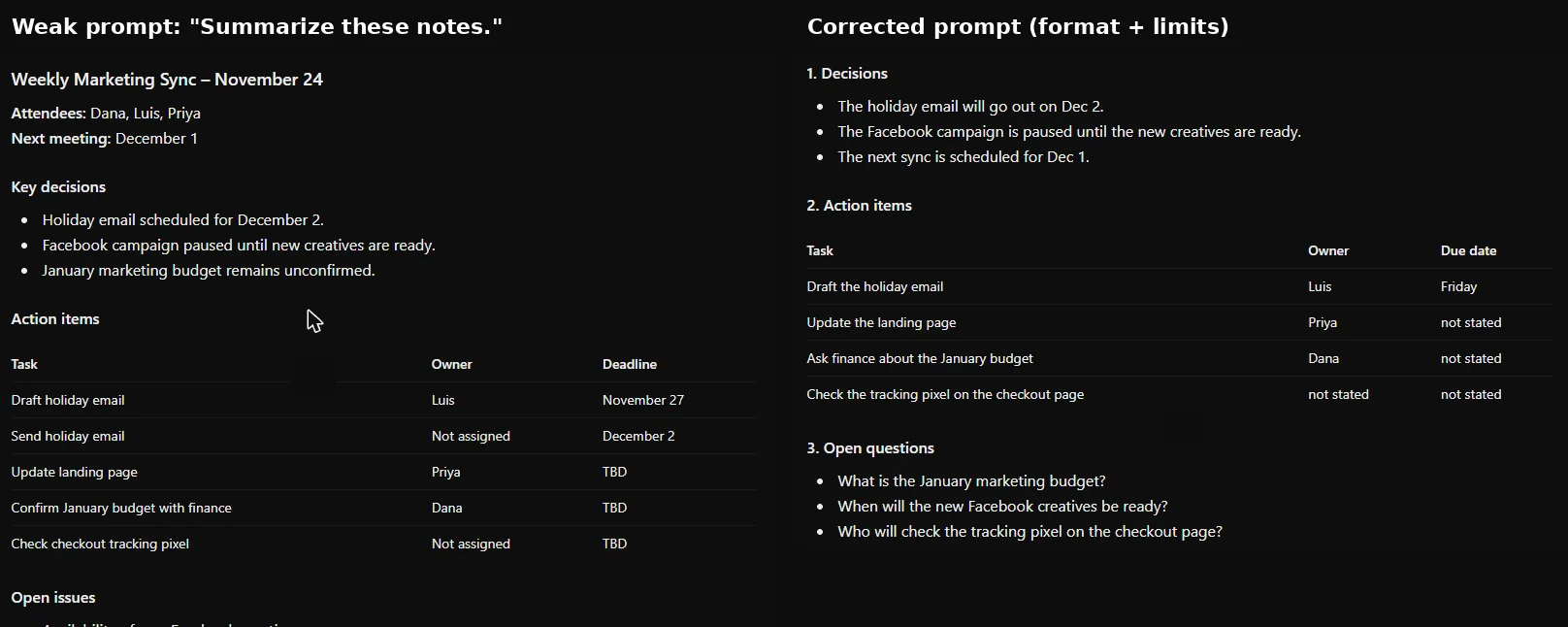
What happened when we ran both. We gave ChatGPT the same short notes twice, in a temporary chat: “Weekly marketing sync, Nov 24. Present: Dana, Luis, Priya. Dana said the holiday email goes out Dec 2; Luis will draft it by Friday. We agreed to pause the Facebook campaign until the new creatives are ready. Priya to update the landing page, no date set. Budget for January still unclear, Dana to ask finance. Someone needs to check the tracking pixel on the checkout page. Next sync Dec 1.”
- Weak prompt: a tidy answer, but with two guesses. It turned “by Friday” into “November 27”, a date the notes never give, and listed the unconfirmed January budget as a decision.
- Corrected prompt: the same facts, no guesses. “Friday” stayed “Friday”, three cells say “not stated”, and the budget moved to the open questions, where it belongs.
Which prompt formulas work for everyday tasks?
These 15 formulas cover the tasks most people bring to ChatGPT: summarizing, writing, planning, deciding and studying. Replace the words in square brackets. Each formula already contains a format and a limit, so you only add your context.
| Task | Formula |
|---|---|
| Summarize | Summarize the text below in 5 bullets for [audience]. Flag anything unclear. """[text]""" |
| Explain | Explain [topic] to a [beginner] in under 150 words, with one everyday example. |
| Write a [polite] email to [person] asking for [thing]. Under 120 words. End with one clear next step. | |
| Rewrite | Rewrite this to be [shorter / clearer / more formal]. Keep every fact. """[text]""" |
| Proofread | Fix grammar and spelling only. List each change in a table: before | after | why. |
| Brainstorm | Give me 10 ideas for [goal], one line each. Mark the 3 strongest and say why. |
| Plan | Make a [7]-day plan to [goal]. I have [30 minutes] a day. Table: day | task | time. |
| Compare | Compare [A] and [B] for [my use]. Table: criterion | A | B. End with a one-line pick. |
| Decide | List pros, cons and risks of [choice] for someone who [situation]. What would change your answer? |
| Study | Quiz me on the notes below, one question at a time. Wait for my answer, then correct me. """[notes]""" |
| Spreadsheet | Write a [Excel / Google Sheets] formula that [does X]. Column A = [..], B = [..]. Explain each part. |
| Meeting notes | Turn these notes into: decisions, action items (owner, due date), open questions. """[notes]""" |
| Resume | Tailor these resume bullets to this job post. Use only facts from my resume. """[resume]""" """[post]""" |
| Critique | Act as a tough editor. Name the 5 weakest points of this draft, worst first, with a fix for each. |
| Research | Search the web for [topic] from the last 12 months. Give a source link for every claim. |
Want prompts for one specific job, like images, resumes or social posts? Our prompt library goes deeper on each. If you would rather learn by building something, try one of these AI projects for beginners.
How do you check a ChatGPT answer?
Treat every answer as a first draft, then verify the parts that would hurt you if they were wrong: numbers, dates, quotes and sources. ChatGPT can state a wrong fact in a confident voice. OpenAI’s own help page tells users to verify quotes, data and references (Does ChatGPT tell the truth?).
| Check | How to do it |
|---|---|
| 1. First draft rule | Never paste an answer straight into an email, a report or homework. |
| 2. Ask for weak spots | Type: “Which parts of this are you least sure about?” |
| 3. Ask for sources | Turn on web search, then type: “Give a source link for each claim.” Open the links yourself. |
| 4. Check the originals | Compare quotes, numbers, dates and citations with the page or document they come from. |
| 5. Redo the math | Type: “Show each step.” Then redo the key step by hand or in a calculator. |
| 6. Get a second opinion | Paste the answer into a new chat and ask: “Find the errors in this.” |
| 7. Ignore the tone | A confident answer is not a correct answer. Wrong answers sound sure too. |
Exercise 3: check an output
We wrote the answer below for practice, with three problems planted in it. Imagine ChatGPT gave it to you for a slide about meeting overload. Find the problems before you read the solution.
Shorter meetings pay off fast. A 2021 university study found that employees lose 31% of their week to unproductive meetings. If each person on a team of 8 saves 25 minutes a day, the team gets back about 20 hours a week. Experts agree that 15 minutes is the ideal meeting length.
Solution:
- The study has no name. “A 2021 university study” can’t be looked up. We made up the 31% figure for this exercise, and a real answer can contain one that looks just as solid. Fix: turn on web search and ask for the title, the authors and a link. No link, no slide.
- The math is wrong. 8 people times 25 minutes is 200 minutes a day. Over a 5-day week that is 1,000 minutes, or about 16.7 hours, not 20. Fix: ask “Show each step,” then redo the multiplication yourself.
- “Experts agree” is a claim with no one behind it. Which experts, and where? Fix: ask who said it and where, or cut the sentence.
The follow-up prompt to paste after any answer you plan to reuse
Review your last answer.
1. List every factual claim, number and quote in a table: claim | source link | how sure you are (high, medium, low).
2. Show each step of any calculation.
3. Mark anything you can't support with a source as "unverified".
The table this prompt returns is a to-do list for you, not proof. A link only counts once you have opened it and found the claim on the page.
Which ChatGPT shortcuts and features are worth knowing?
Start with one shortcut: on the ChatGPT website, press Ctrl + / (Command + / on a Mac) to see the full list of keyboard shortcuts for your version. The table below lists the ones worth learning first, plus the menu paths for the features people miss.
| Shortcut or menu path | Where | What it does |
|---|---|---|
| Ctrl + / (Command + /) | Web | Shows the complete list of keyboard shortcuts |
| Ctrl + Shift + ; (Command + Shift + 😉 | Web | Copies the last code block |
| Option + Space | Mac app | Opens the Chat Bar from any app |
| Command + . | Mac app | Stops a response while it is being written |
| Command + F | Mac app | Finds text inside a conversation |
| Alt + Space | Windows app | Opens the companion window. Change it in Settings > App > Companion window hotkey. |
| + > Web search | Message box | Searches the web. You can also type @ and pick Web search. Open the ••• menu and select View sources to see where an answer comes from. |
| + > Add photos & files | Message box | Uploads a file: PDF, Word document, spreadsheet, slides, image or audio |
| @study | Message box | Type it at the start of a message and pick Study. ChatGPT then guides you with questions instead of handing over the answer. |
| Temporary | New chat | Keeps the chat out of your history unless you save it, and creates no memories. OpenAI may keep a copy for up to 30 days for safety. |
| Settings > Personalization | Web and desktop | Custom instructions: standing rules for how ChatGPT answers you. On mobile: Settings > Customize ChatGPT. |
| Settings > Personalization > Memory | All apps | Shows what ChatGPT remembers about you. Delete a memory or turn Memory off. |
| New project | Sidebar | Keeps related chats, files and instructions together |
| Share > Create link | Open chat | Makes a link to the conversation. On a personal account, later messages are not added until you select Update link. |
| ••• next to a chat | Sidebar | Pin chat, Archive or Delete. Archived chats are in Settings > Archived chats. |
| Microphone icon | Message box | Dictates your prompt. You can edit the text before you send it. |
How we checked: every row matches an OpenAI Help Center article or release note. Menus can differ by app, plan and region.
The help pages behind the table, if you want the full detail: ChatGPT release notes (web shortcuts, pinned chats), Chat Bar on Mac, Windows app, web search, file uploads, study mode, Temporary chat, custom instructions, Memory, Projects, shared links and archiving.
Two of these features save the most typing. Custom instructions hold the context you would otherwise repeat in every chat: your job, your audience, the tone you like. A project does the same for one piece of work, with its own files and instructions. For the bigger picture on the tool itself, read our ChatGPT review.
What mistakes should you avoid with ChatGPT?
The most common mistake is a one-line request with no context, followed by giving up when the answer is bland. The second is trusting a confident answer without checking it. Here are the eight habits on the sheet, each with its fix.
| Mistake | Do this instead |
|---|---|
| A one-line ask with no context | Add who it is for and why you need it |
| Five tasks in one prompt | Split them and go one at a time |
| “Make it better” | Say better how: shorter, clearer, warmer |
| Only listing what not to do | Say what to do instead |
| Starting a new chat after a weak answer | Follow up in the same chat: “shorter,” “more formal” |
| Copying quotes, numbers or citations unchecked | Run the 7 checks first |
| Pasting passwords, ID numbers or private client data | Replace them with placeholders like [name] |
| Asking “Did you write this?” | Skip it: ChatGPT can’t reliably tell who wrote a text |
Our take
Print the sheet if you use ChatGPT a few times a week and your answers feel generic. The 5-part structure and the format lines fix most of that within a day. Regular users will get more from blocks 5 and 6: the checks, custom instructions and projects. One limit: the formulas are starting points we wrote, so adjust the words in brackets until the answer fits. Menus change often, so treat block 6 as a map and press Ctrl + / for the live list. For more guides like this one, see our Learn AI hub.
FAQ
Is there a free ChatGPT cheat sheet PDF?
Yes. The PDF on this page is free and needs no email address. It is one US Letter page with a prompt structure, 15 prompt formulas, 7 checks, 16 shortcuts and menu paths, and 8 mistakes to avoid. Click “Download the PDF” at the top of the page and print it at 100% scale.
How should you structure a ChatGPT prompt?
Start with the task, then add context, format, tone and limits. In practice: say what you want, who it is for, the shape and length of the answer, the voice, and what ChatGPT should not invent. For quick questions the task alone is enough. Add the other parts when the first answer is too generic.
Is this ChatGPT cheat sheet good for beginners?
Yes. You need no technical background. Begin with block 1, the five parts of a prompt, and block 4, the ready-made formulas. Replace the words in square brackets and send. Once that feels natural, add the checks in block 5 before you reuse any answer.
What are the keyboard shortcuts for ChatGPT?
On the website, Ctrl + / (Command + / on a Mac) shows the full list, and Ctrl + Shift + ; copies the last code block. In the Mac app, Option + Space opens the Chat Bar and Command + . stops a response. In the Windows app, Alt + Space opens the companion window.
Can you make ChatGPT write like you?
Yes, to a point. Paste two or three samples of your own writing between triple quotes and ask ChatGPT to match their tone, sentence length and vocabulary. To keep that style across chats, describe it in custom instructions under Settings > Personalization. Always reread the result: it imitates your style, not your facts.
Do these prompts work in other AI chatbots?
Mostly, yes. The prompt structure, the context lines, the format instructions and the 15 formulas are plain English and work in any chatbot. The checks in block 5 apply everywhere too. Only block 6 is specific to ChatGPT: the shortcuts and menu names belong to its apps.
Update log
Nov 28, 2026: first version, with the one-page PDF.