The free way to turn notes into a podcast is NotebookLM’s Audio Overview: add your notes as a source, choose a format and a length, and two AI hosts discuss them. In our test on Nov 26, 2026, a page of study notes (285 words) became a 5 minute 54 second episode in about 4 minutes, on a free Google account. Set the output language first, and expect the episode to run longer than you asked: ours did on the “Short” setting.
What do you need before you start?
- A free Google account. NotebookLM now appears as “Gemini Notebook” in some menus; the address notebooklm.google.com still works.
- Your notes as text, a PDF, a Google Doc or a web page. To follow along exactly, use our starter notes on how LLMs work.
- Headphones and your notes open while you listen, to catch anything the hosts add.
How do you turn notes into a podcast with NotebookLM?
- Create a notebook and add your notes. Click Add sources. Paste text with “Copied text”, or upload a file. NotebookLM writes a short summary of the source right away.
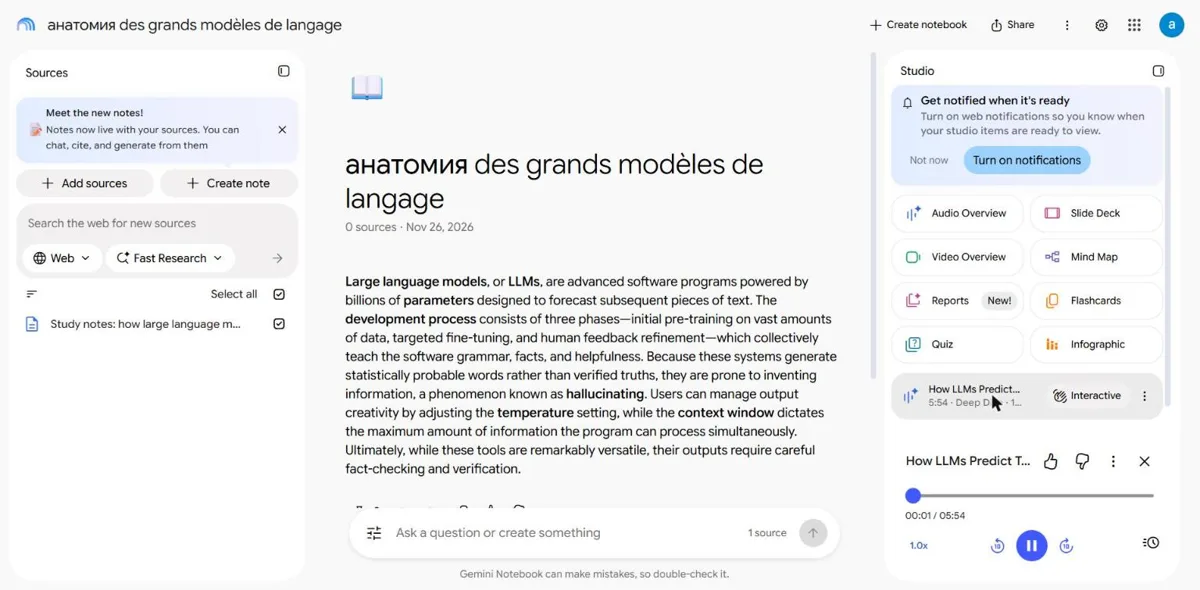
- Set the output language. Settings (gear icon), Output language. On our account, set to French by default, the notebook was titled “анатомия des grands modèles de langage”, half Russian and half French, although the notes and the interface were in English. Choosing English fixed the audio.
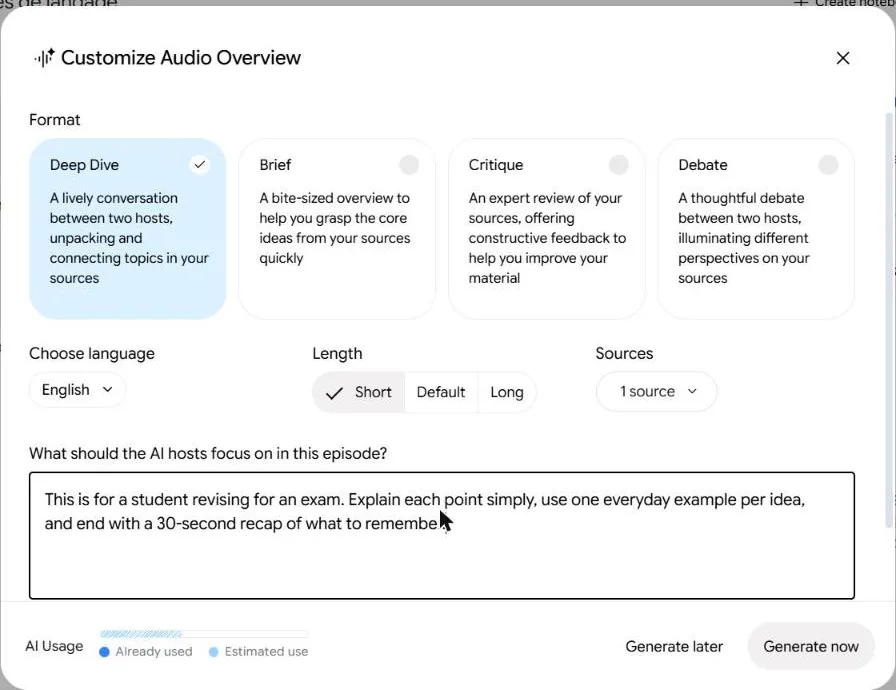
- Open the Audio Overview settings. In the Studio panel, click Audio Overview. You choose a format, a length and what the hosts should focus on.
- Write a focus line. Ours: “This is for a student revising for an exam. Explain each point simply, use one everyday example per idea, and end with a 30-second recap of what to remember.”
- Generate, then come back. The page said “Come back in a few minutes”; ours was ready in about 4. The episode appears in the Studio panel with a player, speed control and 10-second skips.
- Listen with your notes open. Hosts improvise around your material. Write down anything they say that is not in your notes and check it before you rely on it.
On this page
Which Audio Overview format should you pick?
| Format | NotebookLM’s description | Use it for |
|---|---|---|
| Deep Dive | A lively conversation between two hosts, unpacking and connecting topics in your sources | Revising a chapter, the one we tested |
| Brief | A bite-sized overview to help you grasp the core ideas quickly | A quick recap before class |
| Critique | An expert review of your sources, offering constructive feedback | Feedback on your own draft or essay |
| Debate | A thoughtful debate between two hosts on different perspectives | Topics with two sides |
Length offers Short, Default and Long. We chose Short and got 5:54, so treat the setting as relative, not a timer.
What are the limits on the free plan?
- Audio Overviews are generated in a queue; you wait a few minutes for each one.
- The settings menu lists “Remove watermarks” as a paid upgrade.
- Daily generation limits apply; Google does not show a counter for them in the Audio Overview window, only an “AI Usage” bar.
Questions about turning notes into a podcast
Is there a free AI podcast generator from notes? Yes. NotebookLM’s Audio Overview is free with a Google account; our 285-word notes became a 5:54 episode in about 4 minutes.
Can I choose how long the podcast is? Roughly. You pick Short, Default or Long; Short gave us almost 6 minutes.
Can the podcast be in another language? Yes. Set Settings, Output language before you generate; it also decides the language of titles and summaries.
Will the AI hosts stick to my notes? They build on them but talk freely. Listen once with your notes open before you revise from the episode.
This is project 2 of AI projects for beginners. Our full NotebookLM review covers the plans and limits, and best AI for research compares it with Elicit, Consensus and Perplexity.
Update log
Nov 26, 2026: tutorial published from our test on a free account.
Spotted an outdated price or an error on this page? Request an update. Want us to cover another tool? Suggest a review.