LM Studio and Ollama both run open models on your own machine. For years the choice was a window with sliders against a terminal command. That split still exists, but it is no longer the whole decision, because both now rent cloud inference at the same two prices: $20 and $100 a month. The local app is free on both sides.
Verdict: take LM Studio if you want a desktop app that downloads models, serves an OpenAI-compatible endpoint, connects MCP tools and carries an agent, free for local use. Take Ollama if you work from a terminal or a server, want one command per model, and prefer metered cloud access. Neither free tier is a trial.
The two in one table
| LM Studio | Ollama | |
|---|---|---|
| What it is | A desktop app, Bionic, with an agent, a chat window and a model manager. | A CLI and a desktop app, a model library and a local server. |
| Where models run | On your machine through llama.cpp, and through MLX on Apple Silicon. | On your machine through Ollama’s runtime, or in Ollama’s cloud. |
| Interface first | A window, with settings next to the conversation. | A terminal, with an app on top. |
| Agent | Bionic Agent, included on the Free plan. | Launches Claude Code, Codex CLI or OpenCode from the terminal. |
| Model formats | GGUF, plus MLX on a Mac. | Models pulled from Ollama’s own library. |
| Local API | REST API and OpenAI-compatible API. | Native API on localhost:11434, OpenAI and Anthropic compatible. |
| Cloud entry | $20 a month for Bionic+. | $20 a month for Pro, or $200 a year. |
| Team offer | Organizations on request, no public price. | $500 a month for Team. |
Every price on this page was read on November 22, 2026, on lmstudio.ai/pricing and ollama.com/pricing.
What each one costs
The LM Studio app is $0 and stays $0. Free carries Bionic Agent, local models through llama.cpp and MLX, offline voice transcription, LM Link for five devices and a limited web search. The paid plans sell cloud access, not the app.
| LM Studio plan | Price | What it adds | Read on |
|---|---|---|---|
| Free | $0 | Bionic Agent, local models, offline transcription, LM Link for 5 devices, limited web search | November 22, 2026 |
| Bionic+ | $20 per month | Hosted open models such as Kimi K3, GLM 5.3 and DeepSeek V4 Flash, bulk token discount, 20 devices, page extraction | November 22, 2026 |
| Pro | $100 per month | Five times the usage limits, 100 devices, included usage for GPT Sol 6.1 and Claude Opus 5.5, early access | November 22, 2026 |
| Organizations | Custom | Centralized billing, pooled credits or seat plans | November 22, 2026 |
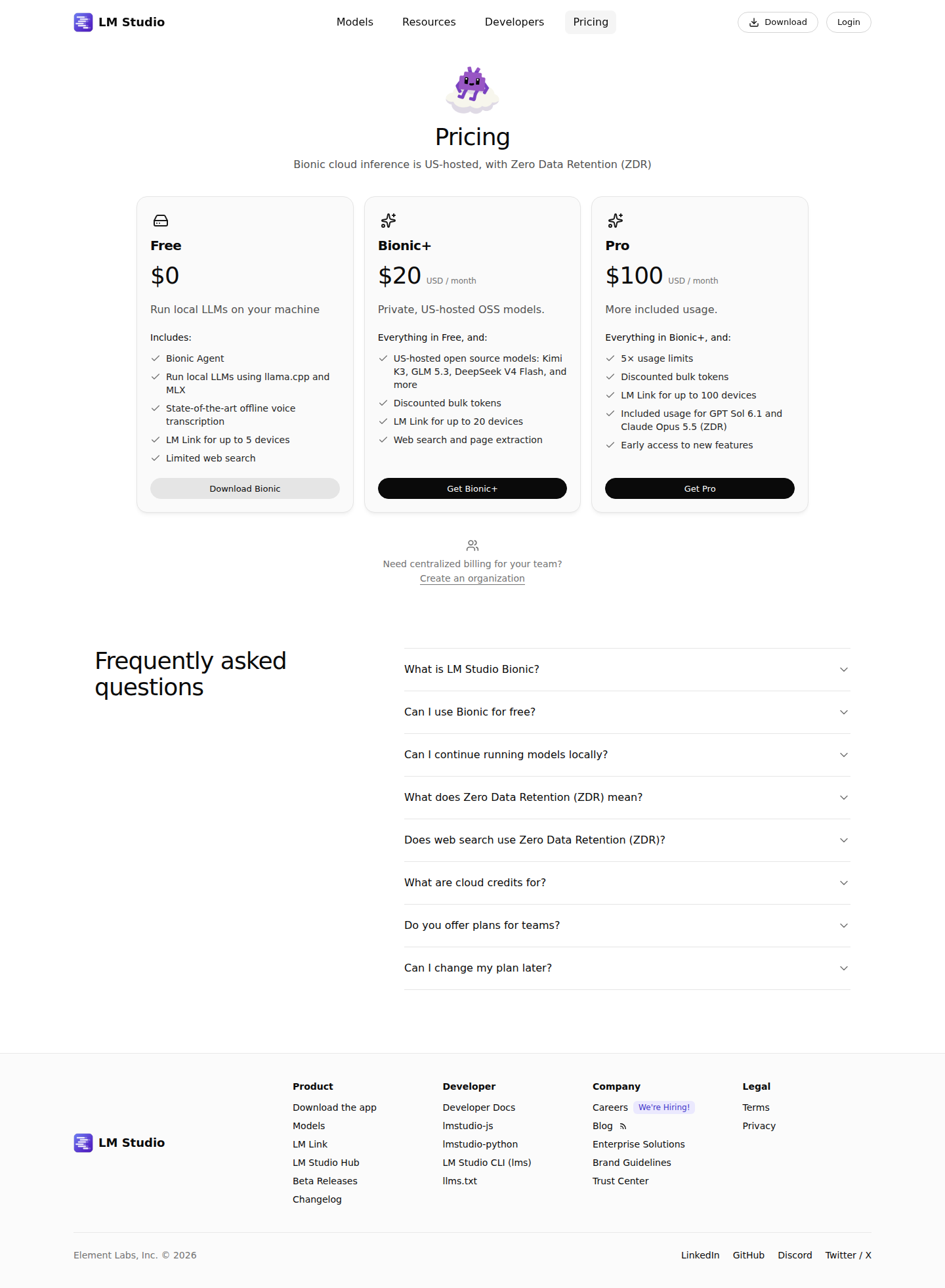
LM Studio publishes no yearly rate: one monthly figure per plan and no billing switch, so a team that budgets cloud access by the year has no published option.
Ollama’s free tier is named Pay as you go, and at $0 it includes local models, three concurrent requests and no service fees. Above it the ladder is metered: each plan bundles a monthly credit, and tokens beyond it are billed from a balance.
| Ollama plan | Monthly view | Yearly view | What it adds |
|---|---|---|---|
| Pay as you go | $0 | $0 | Local models, no subscription, 3 concurrent requests |
| Pro | $20 per month | $16.67 per month, $200 a year | $60 of usage credits, larger pro models, Fast mode announced |
| Max | $100 per month | Not published | $300 of credits, early access to new models, 10 concurrent requests |
| Team | $500 per month | Not published | Unlimited users, $1,000 of shared credits, centralized billing, priority support |
| Enterprise | Custom | Custom | Model access controls, budgets per user and API key, private support channel |

Pro is the same $20 as Bionic+, and the two buy different things. Ollama hands you credits and larger models, LM Studio hands you hosted open models, page extraction and more device links. Above that both ladders meet at $100, where Ollama ships credits and concurrency and LM Studio ships usage limits and two closed frontier models under zero retention.
Ollama also publishes a rate per million tokens: gpt-oss:20b at $0.07 in and $0.30 out, deepseek-v4.1-flash at $0.30 and $1.20, and kimi-k3 at $3.00 and $15.00, halved outside 12:00 and 18:00 UTC on weekdays and all day at weekends. LM Studio advertises discounted bulk tokens but publishes no per-token list.
Speed, and why this page carries no benchmark
We did not benchmark either tool, so there is no tokens per second figure here and no claim that one is faster. What can be established is where speed comes from. LM Studio runs GGUF through llama.cpp on macOS, Windows and Linux, and on Apple Silicon it can also use MLX, Apple’s own framework. Ollama’s documentation covers Nvidia support from compute capability 5.0 and the GPU or CPU split reported by ollama ps, but names no MLX path. That is a difference in the engine, not a measured difference in speed.
Tokens per second move with the model, the quantization, the context length and how much fits in memory. Both tools serve an OpenAI-compatible endpoint, so one prompt, one model at the same quantization and one stopwatch settle it. With Ollama, read ollama ps first: it shows whether the model sits in the GPU or spills into system memory.
Ease of use: a window against a terminal
LM Studio is a window: models download inside the app, a chat opens on the model you load, and the useful settings sit next to the conversation. The same install serves the model on the network, connects MCP servers and reads attached documents offline. For machines without a screen, the documentation describes a headless mode, llmster, and a CLI called lms.
Ollama is a command: ollama run gemma4:e2b downloads about 7.2 GB and opens a chat, ollama pull fetches a model, ollama serve starts the server. The app adds a window, and on macOS it connects Claude or ChatGPT desktop to Ollama models. One default is worth knowing: the context window is 4,096 tokens unless OLLAMA_CONTEXT_LENGTH or num_ctx raises it, which is the usual reason a local model appears to forget the start of a file.
Model catalogs and formats
Both run open-weight models. LM Studio speaks GGUF, the format llama.cpp loads, plus MLX on Apple Silicon, and searches Hugging Face inside the app. Ollama pulls from its own library with one command per model, covering coding, vision, embedding and reasoning models; the quickstart example is gemma4:e2b at about 7.2 GB with 8 GB of VRAM recommended. The catalogs differ: Ollama prices 26 cloud models, from gpt-oss at $0.07 per million input tokens to kimi-k3 at $3.00, while LM Studio’s Bionic+ names Kimi K3, GLM 5.3 and DeepSeek V4 Flash. The license you accept is the model’s, not the runner’s.
The local API, and the agents that use it
Both expose an OpenAI-compatible API. LM Studio documents a REST API, an OpenAI-compatible API, a Python SDK, a TypeScript SDK and the lms CLI. Ollama lists four request formats: its own API, OpenAI Chat Completions, OpenAI Responses and Anthropic Messages, on localhost:11434, with no key for local models.
The agents diverge. LM Studio ships Bionic Agent inside the app, with integrations for Codex, Claude Code, OpenClaw and MCP tools. Ollama launches one instead: ollama launch claude starts Claude Code in the current project, offers to install it, and covers Codex CLI and OpenCode the same way. Our Claude Code review and the OpenCode vs Claude Code comparison cover what happens next.
Privacy and what leaves the machine
Local inference is the privacy feature: a model on your disk answers without a network call. For the paid cloud, LM Studio describes US-hosted inference with zero data retention and states that prompts and responses are not stored by the provider. Ollama states that prompts and responses are never logged or trained on, hosts mainly in the United States, and may route to Europe for capacity. The difference is scope: LM Studio sells zero retention as a plan feature, down to GPT Sol 6.1 and Claude Opus 5.5 usage on Pro, while Ollama applies one rule to every cloud model. Unplugged, a local model is the safest setting, and it costs nothing.
What about llama.cpp directly?
LM Studio is a front end over llama.cpp everywhere, plus MLX on Apple Silicon, and its documentation says so. Ollama wraps its own runtime behind a model manager. Going straight to llama.cpp buys control: your build, your flags, your quantization, no subscription. It costs the model browser, the chat window, working GPU offload and an update path. For most readers the ranking is LM Studio Free on a desktop, Ollama on a server, llama.cpp when a specific build or flag matters.
Who should pick which
Choose LM Studio if the machine is a desktop, the work is interactive, and the agent should share the window with the chat. Free covers local use with Bionic Agent, MLX on a Mac, MCP and an OpenAI-compatible server, and the $20 step buys cloud models rather than the app.
Choose Ollama if the machine is a server, a container or a script, if a model should arrive with one command, and if the bill should follow usage. The CLI is the shortest path from a model name to a working endpoint, Team at $500 a month ends the per-seat question, and the off-peak rate rewards batch work.
The verdict
The free plans cost the same and neither is a demo, so the decision starts with the interface you will open. LM Studio wins on the desktop: one window, an agent, MCP, MLX on a Mac and a local API for nothing. Ollama wins on the server: one command per model, an endpoint that speaks OpenAI and Anthropic, and metered cloud with an off-peak discount.
The paid tiers land at the same $20 and $100, so price does not break the tie; what you buy with it does. Ollama sells capacity. LM Studio sells hosted open models and device links on top of a local app. A solo reader who only wants a model offline should install both free plans, keep the one they open, and pay nothing.
Frequently asked questions
Is LM Studio free? Yes. The Free plan costs $0 and includes Bionic Agent and local models through llama.cpp and MLX. The $20 and $100 plans add cloud models, and local use needs neither.
Is Ollama free? Yes. Pay as you go costs $0 and covers local models, three concurrent requests and no subscription. Cloud usage is metered from a balance, and Pro at $20 a month adds credits and larger models.
Which is faster on a Mac? We did not measure, and no vendor publishes a head-to-head. LM Studio has MLX on Apple Silicon in addition to llama.cpp, while Ollama’s documentation names no MLX path. Speed depends on the model, the quantization, the context length and how much fits in memory, and both serve an OpenAI-compatible endpoint, so one prompt on the same model settles it for your machine.
What are the disadvantages of Ollama? The default context window is 4,096 tokens until you raise it, the interface is a terminal first, and cloud models are metered per token. It also ships no agent of its own; it launches Claude Code, Codex or OpenCode instead.
Which models can I run in Ollama? Locally, anything in its library, with gemma4:e2b at about 7.2 GB and 8 GB of VRAM recommended as the entry example. In the cloud, 26 priced models including gpt-oss, deepseek-v4.1-flash, glm-5.3 and kimi-k3, and our DeepSeek review covers that family from the hosted side.
Can I use them with Claude Code? Yes. Ollama runs ollama launch claude, which starts Claude Code on a local model and offers to install it, and LM Studio lists Claude Code among its integrations and exposes an OpenAI-compatible API.
Sources
https://lmstudio.ai/pricing (read November 22, 2026; Free, Bionic+, Pro, no annual view)
https://lmstudio.ai/docs (read November 22, 2026; llama.cpp and MLX, MCP client, llmster, APIs, SDKs, integrations)
https://lmstudio.ai/enterprise (read November 22, 2026; organizations, SSO, no published price)
https://ollama.com/pricing (read November 22, 2026; monthly and yearly views, per-million-token rates, off-peak rule)
https://docs.ollama.com/quickstart (read November 22, 2026; ollama run, ollama launch claude, OpenAI and Anthropic compatibility)
https://docs.ollama.com/faq (read November 22, 2026; 4,096-token default context, ollama ps)
https://docs.ollama.com/gpu (read November 22, 2026; Nvidia compatibility)
Update log. November 22, 2026: page published. Every price read the same day on the publisher’s own page, both billing views for Ollama where they exist, none for LM Studio because the page has no annual switch. No price was converted and no speed or memory figure is claimed.
More comparisons and local AI tools
Our Qwen review follows one of these model families from the hosted side, the build and data hub lists every developer tool we have priced, and all our head-to-head pages sit on one page.