These two apps are both note tools and they answer different questions. Notion sells a shared workspace where pages, databases and team permissions live in one place, with an AI layer you rent by the month. Obsidian gives you a folder of Markdown files on your own disk and a free app that opens them. Pick the wrong one and you spend a year fighting the model instead of writing.
Verdict: pay for Notion Plus at $12 a month, or $10 a month billed yearly, if your notes have to be shared, queried and assigned as work. Use Obsidian for free if the notes are yours, need to work without a connection, and should survive the day the company changes its mind. Obsidian Sync at $5 a month, or $4 billed yearly, is the only part most solo users ever pay for.
The two apps in one table
| Notion | Obsidian | |
|---|---|---|
| What you are buying | A hosted workspace: pages made of blocks, databases with views, teamspaces and permissions. | A desktop and mobile app that opens a folder of Markdown files you keep yourself. |
| Where the notes live | Notion’s servers. The apps cache what you opened. | On your device, in an open file format, no account needed to start. |
| Offline work | Downloaded pages and your recents and favorites, on desktop and mobile. | The whole vault is local, so the app works the same with or without a connection. |
| Working with other people | Native: comments, real-time editing, teamspaces, database permissions, guests. | Shared vaults through Obsidian Sync, otherwise you share files yourself. |
| AI | Built in: a trial on Free and Plus, the Notion Agent on Business. | Not part of the plans. Any AI comes from community plugins you install. |
| Free plan | Yes, for individuals, with uploads up to 5 MB and a 7-day history. | Yes, the entire app, with no account and no time limit. |
| Entry paid price | Plus, $12 a month, or $10 billed yearly, per member. | Sync, $5 a month, or $4 billed yearly, per user. |
Both vendors’ pricing pages were read on November 21, 2026, and both open on the yearly billing view. The monthly figures below come from the monthly view of the same pages.
What each one costs
Notion prices per member, and a workspace with five people multiplies every line by five. The dollar figures below are the ones in Notion’s own price document; the site localizes the currency, and our own session on November 21, 2026 was served euros at 9.50 for Plus, which is the yearly view of the same rate.
| Notion plan | Monthly billing | Billed yearly | Read on |
|---|---|---|---|
| Free | No charge | No charge | November 21, 2026 |
| Plus | $12 per member | $10 per member | November 21, 2026 |
| Business | $24 per member | $20 per member | November 21, 2026 |
| Enterprise | Custom | Custom | November 21, 2026 |
Obsidian prices the app at nothing and charges for the services around it. Sync is per user, Publish is per site, and the license below them is optional.
| Obsidian product | Monthly billing | Billed yearly | Read on |
|---|---|---|---|
| App | No charge | No charge | November 21, 2026 |
| Sync Standard, 1 vault and 1 GB | $5 per user | $4 per user | November 21, 2026 |
| Sync Plus, 10 vaults and 10 GB | $10 per user | $8 per user | November 21, 2026 |
| Publish | $10 per site | $8 per site | November 21, 2026 |
| Catalyst, early builds | $25 once | $25 once | November 21, 2026 |
| Commercial license | $50 per user a year | $50 per user a year | November 21, 2026 |
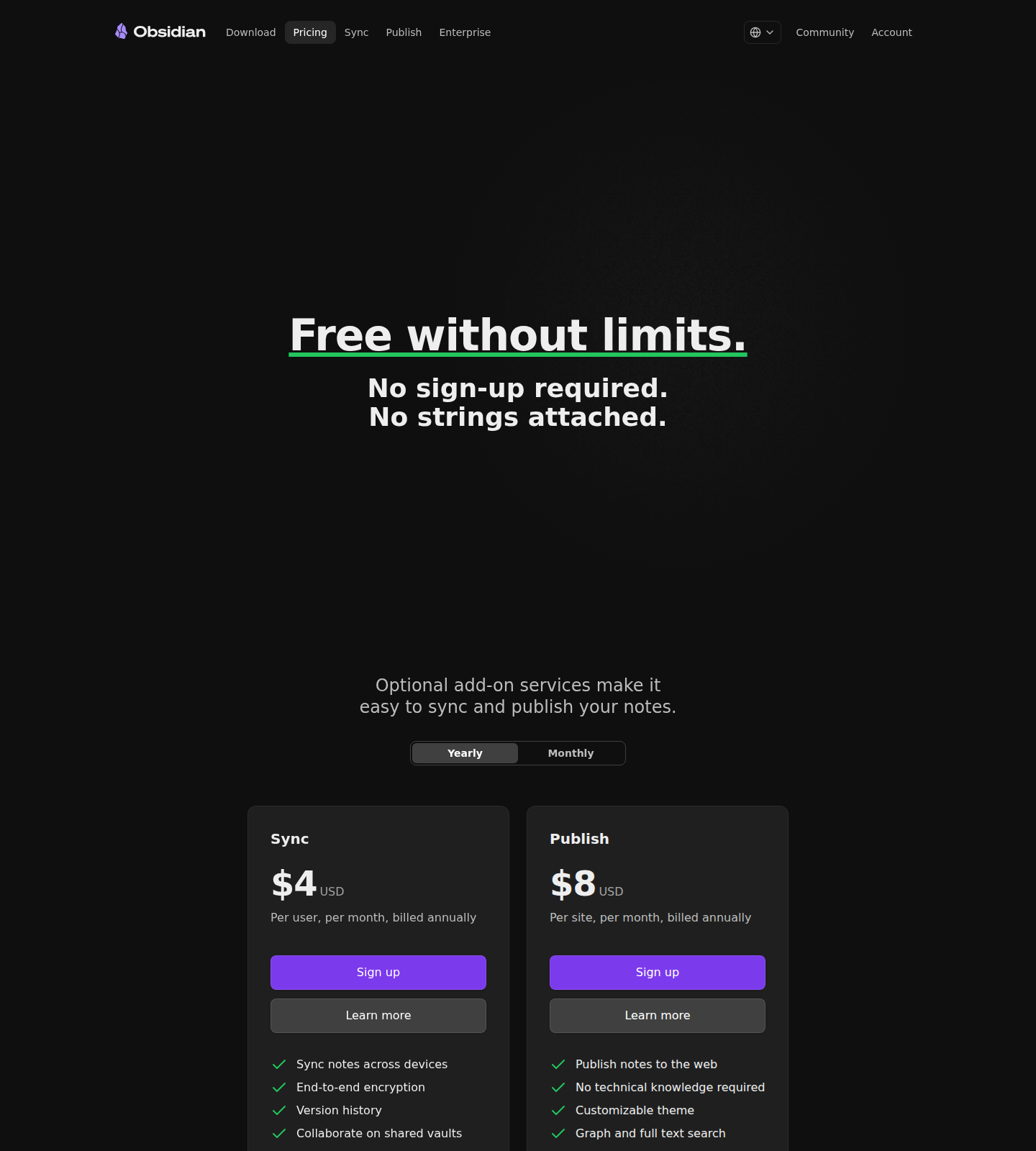
Two details decide the real bill. Notion’s Business plan is where SSO, private teamspaces and the Notion Agent start, so a growing team jumps from $20 to a custom quote only above that. Obsidian’s commercial license is not mandatory, and the company says so in its own FAQ; students, teachers and nonprofits get 40% off Sync and Publish, and both services carry a 7-day refund.
Blocks in a database against files on your disk
Notion’s unit is the block. A paragraph, a to-do, an image, a row in a table and a page are blocks, and the database gives them order: views, filters, relations, formulas, rollups. That is why one Notion page can be a project tracker, a CRM and a wiki at once, and why the same content reads as a table, a board or a calendar. It is also why exporting from Notion gives you HTML or Markdown that loses the relations.
Obsidian’s unit is the note, and the note is a text file with links. Folders are optional, links build the graph, and the file stays readable in any editor for as long as Markdown exists. The homepage argues ownership rather than features: notes stored privately on your device, open formats, no lock-in. Nothing in that model needs an account, and nothing stops working if the company disappears.
Collaboration, databases and the work behind the notes
This is where the comparison stops being close. Notion ships comments, guest access, real-time editing, private teamspaces and database permissions by row. The Free plan caps uploads at 5 MB and keeps a 7-day history; Plus raises both to 5 GB and 30 days. Notion also exposes a public API and webhooks, which is what lets a database feed a form, a site or an automation.
Obsidian has shared vaults through Sync, with real-time updates across a team, and that is the whole collaboration story. There is no permission model inside the vault: either someone has the files or they do not. If your work is “assign this row to Marie, hide the salary column from interns”, Obsidian is the wrong tool and no plugin changes that.
Offline, privacy and who owns the file
Obsidian works offline because the vault is on the disk. There is no sync step to fail and no cache to miss: the app opens the files, and Sync only reconciles devices later, with AES-256 end-to-end encryption so the service cannot read the contents. The vendor states that the apps collect no telemetry and that it never sells user data.
Notion works offline in a narrower way. The desktop and mobile apps let you download chosen pages, and on paid plans the recents and favorites download automatically, which covers a flight or a train ride but not your whole workspace. Collaboration and databases are server features, so an offline Notion is a read-mostly copy of what you had opened. That is a design choice, not a defect, and it is the reason Notion can promise real-time co-editing at all.
AI: native in one, added by plugins in the other
Notion sells AI as part of the workspace. Free and Plus carry a trial of Notion AI, Business includes the Notion Agent, AI Meeting Notes and a search beta across your workspace, and Enterprise adds zero data retention with the model providers. Custom Agents are billed separately at $10 per 1,000 monthly Notion credits. The appeal is context: the assistant reads the pages and databases you already keep there.
Obsidian’s plans carry no AI line at all. The site promotes thousands of community plugins, and the ones that add AI are exactly that, plugins written by third parties, installed by you, with your own API key and your own bill. It is more work and more control: the notes never leave the vault unless a plugin sends them, and the model is your choice.
Who should buy which
Buy Notion if your notes are a team artefact. A small company tracking clients, content and hiring in one workspace gets the database, the permissions, the comments and an AI that can read the whole thing for $12 a member a month, and $10 if it pays the year. The same buyer at $24 a member gets SSO and private teamspaces, which is the price of growing up rather than of features.
Use Obsidian if the notes are personal property. A writer, a student or a developer keeping a second brain for a decade wants plain files, a working offline mode and no subscription that can end the archive. Pay the $5 a month for Sync when two devices have to agree, and the $10 for Publish only if the notes should become a public site.
The verdict
Notion wins when the work is shared and structured, and Obsidian wins when the notes have to outlive the tool. For a solo user who only needs to write, link and keep, Obsidian free is the better purchase at $0, and Notion Plus at $12 a month adds value only once databases, collaboration or the AI layer enter the picture. For a team, the calculation reverses: Obsidian has no permissions to sell, and Notion’s $10 a member billed yearly buys the coordination the team actually needs.
Frequently asked questions
Is Obsidian really free? Yes. The app costs nothing, needs no account and has no time limit. You pay only for Sync, Publish, Catalyst or the optional commercial license, and Sync starts at $4 a month billed yearly, or $5 month to month.
What is the main downside of Obsidian? Collaboration. There is no permission model and no database layer, so a team that needs assigned rows, hidden columns and comments has to build that elsewhere or use Notion.
Does Notion work offline? Partly. The desktop and mobile apps open downloaded pages, and paid plans auto-download recents and favorites. The full workspace is not mirrored locally, so a database you never opened will not be there.
Which one has better AI? Notion, by default, because Notion AI ships inside the workspace and reads your own pages on the Business plan. Obsidian can reach the same models through community plugins, with your API key, but nothing is included in the price.
Can I move my notes from one to the other? Obsidian’s vault is already Markdown, so the files survive any move. Notion exports Markdown and HTML, and the export flattens database relations, so leaving Notion costs the rebuilding of those links by hand.
Do people still use Notion in 2026? Yes, and the pricing page now sells agents and AI meeting notes on top of the workspace, which places it closer to a work platform than to a note app. Obsidian has stayed a note app, which is why both still exist.
Sources
https://www.notion.com/pricing (read November 21, 2026; yearly view by default, amounts in USD from the price document)
https://obsidian.md/pricing (read November 21, 2026; both billing views)
https://obsidian.md/sync (read November 21, 2026)
https://obsidian.md/publish (read November 21, 2026)
https://obsidian.md/ (read November 21, 2026)
Update log. November 21, 2026: page published. Notion and Obsidian prices read the same day, both billing views for each. No price was converted: Notion’s dollar figures come from its price document, and the euro view our session received is reported as it appeared.
More comparisons and note tools
This page sits in the note and research family. Our NotebookLM review covers the research notebook that reads your sources for you, the NotebookLM vs Perplexity comparison puts two research workflows side by side, and NotebookLM alternatives lists what else does the same job. The productivity tools hub carries every tool we have priced in this category, and all our head-to-head pages are listed on one page.