Niva opened to the public on November 16, 2026, after a year and a half of beta testing with the backers who paid for it. It is graphic design software that runs in a browser, with no install and no subscription: one hour a day is free, a 24 hour pass costs $10, and $100 buys the thing outright. The studio is led by the British artist Stuart Semple and ships with no generative AI tools at all.
The release notes put it plainly. “This is V1.0. Niva is open to anybody now, anywhere in the world.”
What was actually released
One canvas for pixels, vectors and layout. Paint, pen, type, photo work and page layout share a document instead of three applications. Work can be sent to anyone by link without an account, and every account gets a portfolio page.
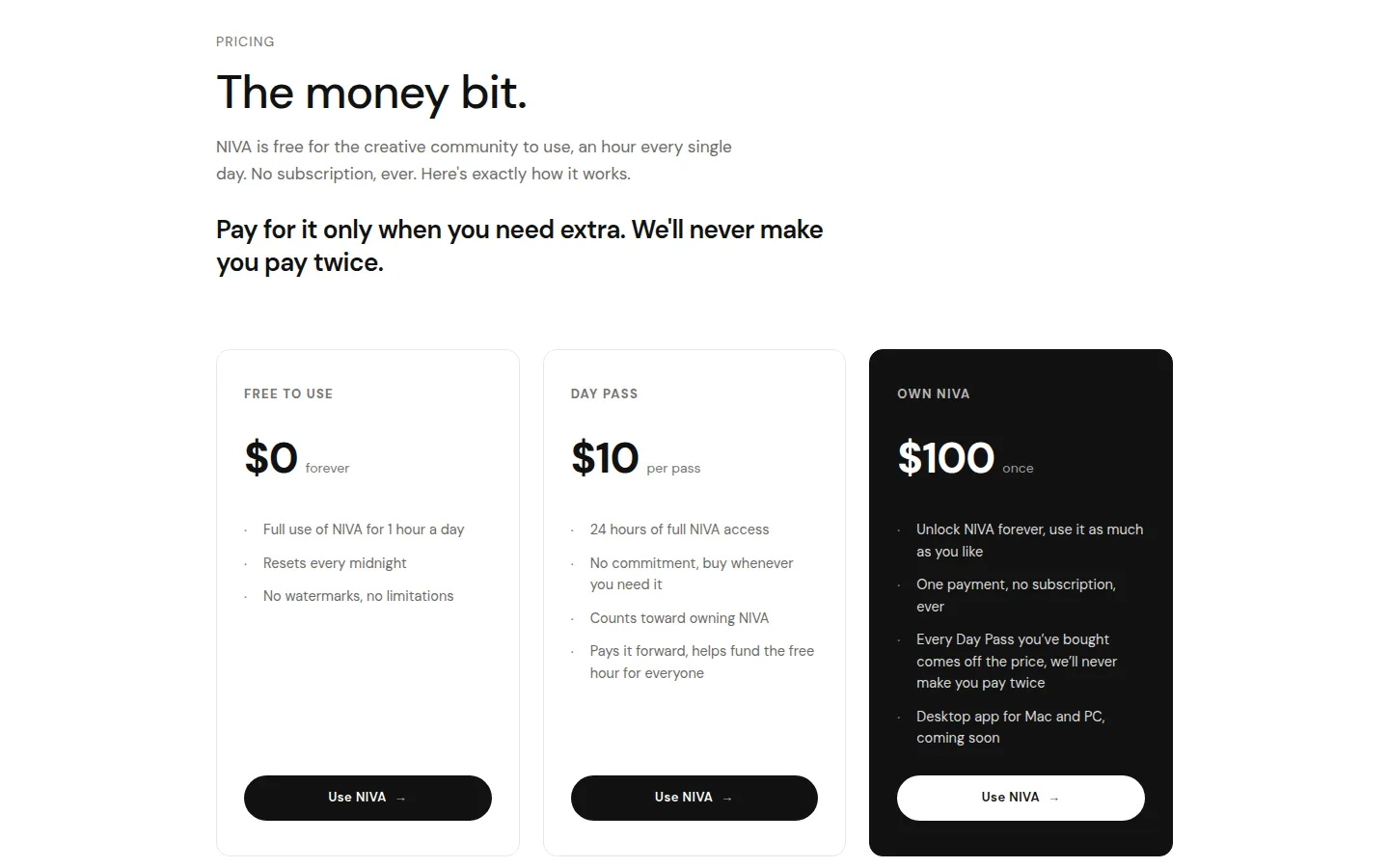
The numbers a buyer needs are on the pricing page, and they are unusual for 2026.
| Plan | Price | What you get | Credit toward owning |
|---|---|---|---|
| Free | $0 | One hour a day, resets at midnight, no watermark, no feature caps | None |
| Day Pass | $10 per pass | 24 hours of full access, no commitment | The full $10 |
| Own Niva | $100 once | Permanent access, one payment, no renewal | Not needed |
Two pieces of arithmetic follow. Ten day passes cost exactly the price of owning Niva, so the trial cannot quietly cost more than the purchase. Spread over a first year, $100 works out at $8.33 a month with nothing after that.
The free tier is not a crippled demo: full use for that hour, no watermark, and work saves automatically before the clock runs out. That is seven hours a week for a student who never pays.
The release notes list both halves of V1.0, what is in and what is not.
| Ships in V1.0 | Not in V1.0 |
|---|---|
| Brushes, eraser, fill, smudge, healing brush, clone stamp | Any generative tool: no text to image, no prompt fill, no generative expand |
| Pen and curve tools, boolean shapes, gradients | A phone app |
| Kerning, text frames that flow, type to curves | A desktop build. Mac and PC are listed as coming |
| Levels, curves, hue, saturation, crop, lasso, magic wand | Offline use, team administration, account controls |
Export covers PNG, JPEG, SVG and PDF, plus a .nva file that keeps every layer and artboard editable. Each account also gets a Storehouse for storing and sorting work.
What the claim rests on
The pricing is confirmed on the editor’s own page, read on November 20, 2026, and nothing here comes from a third party. Two things next to it are weaker.
The first is the “no AI” position. It comes from the founder’s own launch post on Instagram, dated November 16, 2026, and from the FAQ, which frames privacy against a period where AI is absorbing the work of the people it was sold to. The part you can check is the tool list: every feature named in the release notes is a manual tool, and none generates anything. That is an absence, not a published specification.
The second is scale. Niva publishes no user count on any page. The only figures it states are the ones from the campaign that funded it: 3,031 backers pledged £181,709 before there was a product to look at, which averages £59.95 a head. The roadmap files V1.0 under November 2026 and puts the desktop app in early 2027 as an estimate, while the pricing page only says it is coming soon.
What Niva does not publish
- No date for the Mac and PC build, only an early 2027 estimate on a roadmap page.
- No performance figures for large layered files, and no statement on print output for exported PDFs.
- No answer to what a permanent license is worth if the service stops.
- No team, education or volume pricing. The pricing page lists three plans and nothing else.
We did not think that choice was necessary. So the test for every single thing in here was the same. Can someone open Niva and make something they are proud of within five minutes.
The same page admits not everything passes that test yet. A V1.0 that says so is easier to trust than one that does not, but the notes also warn that a crowd will find breakage the team has not seen. We have not run Niva, so none of this is a verdict on how it performs.
On this page
What it changes for designers who pay monthly
The interesting change is the shape of the bill, not the tool.
Every AI design product sold this year is a subscription, priced per seat per month, with the renewal carried forever. Niva swaps that for a one time number with a free floor under it. For a freelancer between contracts or a side project that earns nothing yet, the free hour is a working tool at $0, not a watermark to look at.
For a working designer the comparison is narrower than the marketing suggests. If the work depends on generative fill or prompt based editing, Niva is not a cheaper substitute, it is a different job: everything in it is done by hand, which is exactly the point the founder makes. Someone who needs both pays for both.
What $100 buys
- A permanent license to the browser studio, with no renewal and no seat fee.
- Full credit for every day pass already bought, so the trial is never repaid twice.
- The desktop app when it ships, in the company’s words, for owners first.
Three questions are worth answering before the money moves, and none is on the site. What a 500MB layered document does to a browser tab. Whether a PDF exported for print holds its type and color. And what happens to a permanent license if the studio closes.
The structural caution is vendor size. One artist, a handful of collaborators and a funded campaign is a real product with a small team behind it. That is not a reason to avoid it, it is a reason to keep PDF and SVG exports next to the native .nva.
The Neural Minute take
Read Niva as a pricing document before you read it as software.
The $10 pass that converts into $100 of ownership is the cleanest anti subscription mechanic we have seen in a creative tool, because no part of the trial is wasted. If AI editors keep raising prices and moving features behind tiers, that mechanic gets copied. It is the part of this launch that will outlive the product.
Our read on the product is more cautious. Niva is not an AI tool and we cover AI tools, so the honest framing is that it is the counter position: a studio whose selling point is that a person does the work. That is a real market at a price that opens it up. What we would want before pointing a reader at it for paid work is evidence on large files and print output, plus a second point release to show it holds under load. The free hour means nobody has to take our word for it.
Sources
- Niva V1.0 release notes, published by Niva, read on November 20, 2026.
- Niva pricing page, read on November 20, 2026: the three plans, their prices and the credit rule.
- Niva FAQ, read on November 20, 2026: the free hour, autosave and the privacy position.
- Niva roadmap, read on November 20, 2026: V1.0 filed under November 2026, the early 2027 estimate, and the Kickstarter totals of 3,031 backers and £181,709.