Minute Verdict
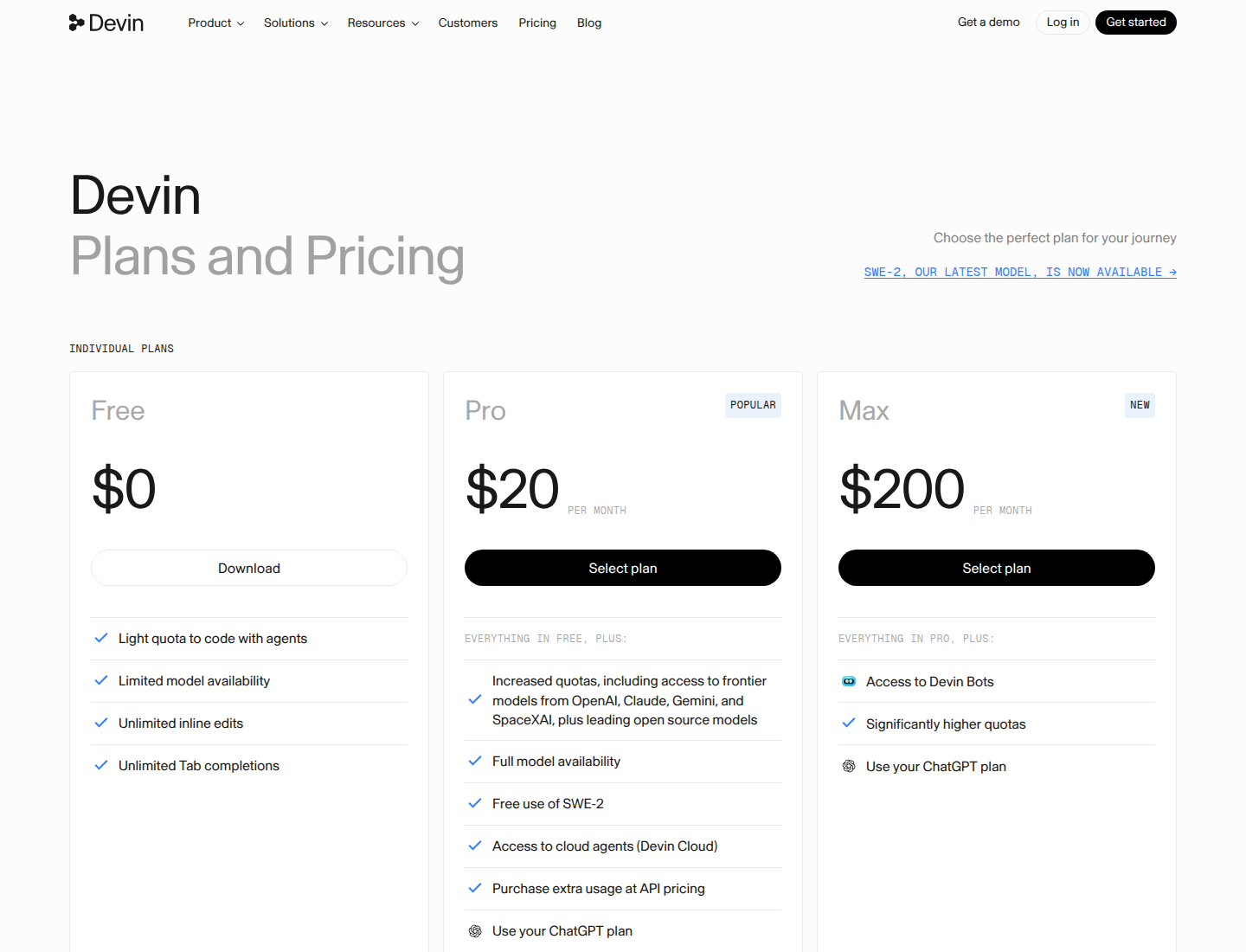
Devin is Cognition’s autonomous software engineer. You hand it a ticket or a Slack thread, it works in its own cloud machine, writes the code, tests it in a browser and opens a pull request. Pro costs $20 a month with a daily and weekly quota, and work past that quota is billed as prepaid credits at API list prices.
Buy Pro if you have a backlog of small, well-specified tasks and a reviewer who can judge a pull request. Stay away if you need a fixed price per ticket, because Devin sells tokens and publishes no message count.
Best for: a small engineering team that wants bug fixes, tests and dependency upgrades handled without adding headcount.
Not for: a solo developer who needs to know what a month of agent work will cost before paying.
From: $20/mo billed monthly, checked November 18, 2026
What Devin does
Devin is not an autocomplete and not an editor plugin. It is an agent that runs a task from the first read to a branch, then hands the branch back. In Devin Cloud, each session gets its own virtual machine, on Windows, Mac or Linux as needed, with a browser inside it. Devin builds the project, clicks through what it built, records the run and attaches the evidence, which is what makes the pull request reviewable without a second machine on a desk.
Cognition sells the same agent on five surfaces. Devin Cloud is the web app where sessions are queued, steered and reviewed. Devin Desktop is the former Windsurf IDE, renamed on June 2, 2026, with a Kanban command center that lists local and cloud agents in one view. The Devin CLI is a terminal agent bundled with that desktop app, with a handoff command that moves a local session to the cloud. Devin Review reads pull requests, DeepWiki answers questions about a repository, and a REST API and SDK sit under all of it.
The tasks it is built for are the repetitive ones a team keeps postponing: reproducing a bug from a report, writing the tests around a change, migrating a framework, upgrading dependencies, reviewing a pull request, explaining an old module. Cognition’s own rule of thumb is that if a person can do the task in three hours, Devin can most likely do it, with extremely difficult work named as the exception.
Two details change the working day. Devin reads a ticket from Linear, a pull request on GitHub, GitLab or Bitbucket, or a message in Slack, so it joins the workflow instead of adding a tab. And sessions run in parallel: Pro and Max allow ten at a time, Teams and Enterprise remove the cap, which turns a backlog into a queue.
On this page
What you get for the money
| Plan | Price | What is included | The limit that matters |
|---|---|---|---|
| Free | $0 | A light quota for the agent, Devin Review, DeepWiki, unlimited inline edits and Tab completions | Limited model list, cloud sessions are not included |
| Pro | $20/mo | Cloud sessions, the CLI and Devin Desktop on one daily and weekly quota, Slack, Linear and MCP integrations, extra usage as prepaid credits | One user, ten concurrent sessions, no published message count |
| Max | $200/mo | Everything in Pro, a much larger weekly quota with no daily cap, Devin Bots | One user, still metered in tokens |
| Teams | $80/mo plus $40/mo per full seat, up to 100 members | Shared prepaid credits, SAML or OIDC single sign-on, three usage tiers, two free concurrent sessions per user, unlimited concurrency | No per-member allowance: every session draws from the same pool |
| Enterprise | Custom | SCIM, role-based access, Jira and Microsoft Teams integrations, VPC deployment | Quote only, no published rate |
Pro at $20 a month comes to $240 for a year, and there is no annual view to bring that down. A team of five pays $80 for the plan plus $200 for its seats, all of it loaded into one credit pool that never expires.
Where it falls short
- The unit on the invoice is a token, not a task. The quota refreshes daily and weekly, and once it is gone the work is billed as prepaid credits at API list prices. Nobody can say before checkout how many pull requests $20 buys.
- There is no annual plan and no free trial of a paid plan. Cognition’s billing documentation says a trial is not offered, so trying Pro costs $20, and the refund exists before the subscription is used, not after.
- Pro and Max are single-user plans. A team that wants more than one person needs Teams, which starts at $80 before a seat is added.
- Individual plans cap concurrency at ten sessions. That is a real ceiling for anyone whose plan is to empty a backlog in one night.
- Jira and Microsoft Teams integrations are sold with Enterprise. On the self-serve plans the connections are Slack, Linear, GitHub, GitLab, Bitbucket and MCP servers.
- On Teams, the $80 subscription is itself loaded as credits and every member draws from the same balance. One heavy user can spend the quota of five, and the admin reads it afterwards in the usage tiers.
Devin alternatives
- Cursor, from $8 a month on the Plus seat of its subscription, keeps the developer inside an IDE with an agent beside them, and cloud agents start on the $30 seat. Cursor review
- Claude Code, from $20 a month with any paid Claude plan, is Anthropic’s terminal agent, included in a subscription many teams already pay for. Claude Code review
- Kimi Code, from $19 a month, is a terminal agent sold inside the Kimi membership, and it imports Claude Code sessions so a repository does not start from zero. Kimi Code review
Who it is for: Devin
It fits a team with a messy backlog and a review process that already works. Bug reports, flaky tests, dependency bumps and small features are the tasks where an agent returning a tested branch saves an afternoon, and the pull request is the checkpoint that keeps quality where it was. A team of five pays $80 for the plan and $200 for its seats, and can hand the whole pool to whoever is drowning that week.
It fits less well when the buyer is one developer paying out of pocket, or when the work is hard to specify. A vague ticket produces a vague pull request, and reviewing that costs more than writing the fix. Anyone who wants to stay inside an IDE all day is better served by Cursor, or by the IDE the same company now sells as Devin Desktop, which the Windsurf review covers. The rest of the field sits in the build tools hub, and a terminal-first buyer should read the Claude Code review before paying for cloud sessions.
How we checked
We read the pricing grid in its only published view on November 18, 2026, the billing documentation for self-serve plans, the quota and usage documentation for Devin Desktop, the CLI quickstart, the Devin Cloud introduction and the announcement of the Windsurf rename. We have not run a Devin session yet, so this is a research review and no result on this page comes from a task of ours. The question a hands-on test would settle is cost per ticket: how many real pull requests one $20 week buys on a repository of a known size. The label turns to Hands-on the day that test runs.
Timeline
- July 14, 2025: Cognition acquires Windsurf. (note from the Windsurf chief executive)
- March 2026: prepaid credits are replaced by a daily and weekly quota across Devin. (quota documentation)
- June 2, 2026: Windsurf becomes Devin Desktop, with the agent command center as the default view. (announcement)
What to do next
Start on Free to see whether the agent reads your repository the way you would, then take Pro for one month at $20 and open Settings, then Usage and limits, in the first week: the daily and weekly pattern tells you whether Pro is enough. Write every ticket with a completion criterion, since a test that passes or a deployment that loads is what Devin checks against. If the backlog is the reason you are buying, count the seats before choosing Teams, because the $80 plan alone buys no member.
FAQ
Does Devin have a free plan? Yes. Free costs $0 and includes a light quota for the agent, Devin Review, DeepWiki, unlimited inline edits and unlimited Tab completions, with a limited model list.
How much does Devin cost? Pro is $20 a month and Max is $200 a month, both billed monthly for one user. Teams costs $80 a month for the plan plus $40 a month per full seat, up to 100 members. Enterprise is quoted. Usage past the included quota is sold as prepaid credits at API list prices.
Is Devin legit? Cognition builds it, and the company acquired Windsurf in July 2025 before renaming that IDE Devin Desktop in June 2026. The pricing grid, the billing documentation and the CLI documentation are public and dated.
Does Devin have a free trial? No. Cognition’s billing documentation says free trials of paid plans are not offered and that support cannot add one to an account. The Free plan is the way to try the agent.
Can I pay for Devin with my ChatGPT subscription? On paid plans, yes. An eligible ChatGPT Go, Plus or Pro subscription can pay for GPT model usage so that part does not count against the Devin allowance.
Sources
- https://devin.ai/pricing (checked November 18, 2026, monthly view)
- https://docs.devin.ai/admin/billing/self-serve (checked November 18, 2026)
- https://docs.devin.ai/desktop/accounts/quota (checked November 18, 2026)
- https://docs.devin.ai/desktop/accounts/usage (checked November 18, 2026)
- https://docs.devin.ai/cli/index.md (checked November 18, 2026)
- https://docs.devin.ai/ (checked November 18, 2026)
- https://devin.ai/blog/windsurf-is-now-devin-desktop (checked November 18, 2026)
- https://devin.ai/blog/windsurfs-next-chapter (checked November 18, 2026)
Update log
Published November 18, 2026, prices checked the same day on devin.ai/pricing in the monthly view, which is the only billing view Cognition publishes.
Spotted an outdated price or an error on this page? Request an update. Want us to cover another tool? Suggest a review.
Featured in: AI coding tools
