Google published a four-step guide on October 29, 2026 for turning raw notes about past jobs into four resume bullets inside the Gemini app. The post sits in the Gemini App section of Google’s blog, carries a contributor byline rather than a product manager’s, and hands the reader one paragraph of prompt to copy. Nothing in it announces a feature: what Google published here is the text itself.
What was actually released
The page carries two titles, and the gap between them is the first useful detail. The headline reads “How to use Gemini to update your resume”, while the document title and the social card read “Write high-impact resume bullets using Gemini”. The second one is the exact one: the guide does not touch a resume file. It produces four lines of text, and the reader pastes them in.
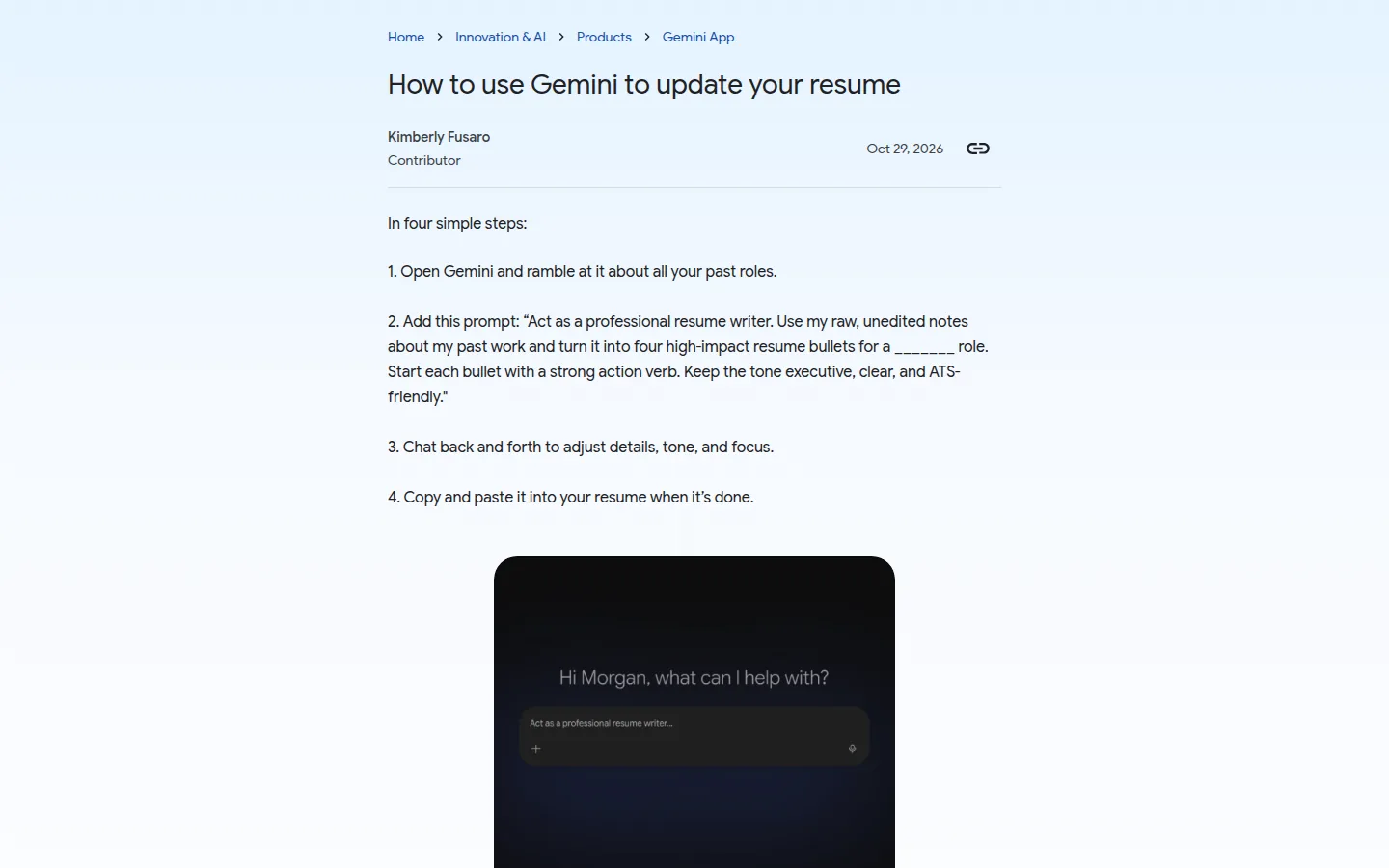
The method is printed under the line “In four simple steps:” and runs the length of a shopping list.
The four steps, as published
- Open Gemini and ramble at it about all your past roles.
- Add the prompt. It asks the model to “Act as a professional resume writer”, to turn raw notes into “four high-impact resume bullets for a _ role”, to open each bullet with a strong action verb, and to keep the tone “executive, clear, and ATS-friendly”.
- Chat back and forth to adjust details, tone, and focus.
- Copy and paste the result into your resume when it’s done.
That is the whole release note. No model is named, no plan is named, no country is named, and no date of availability appears, because nothing is being made available: the app already answered questions, and this is a recipe for asking one better.
What the claim rests on
The load-bearing word in the prompt is “ATS-friendly”, and it does two different jobs at once. Inside the prompt it is an instruction to the model: write bullets a hiring system can read back. In the page around it, it reads like a property of the result. Nothing on the page tests that property. There is no sample bullet, no before and after, no run of the output through any tracking system, and no statement of which system would count.
A reader finishes the four steps without seeing what Gemini returned for anyone, so the only evidence offered for the method is that Google wrote it down. That evidence has a shape worth naming: the post is signed by a contributor, and no product manager, spokesperson or help center page is attached to the claim.
| What the page gives you | What it leaves out |
|---|---|
| Four steps and the prompt, verbatim | Any Gemini model name |
| A fixed target of four bullets per role | Any plan or tier, free or paid |
| The instruction “ATS-friendly” | Any test against an applicant tracking system |
| A blank for the role the reader is targeting | Any guidance on what to type in it |
The number four is hard-coded in the prompt. A role with twelve years behind it and a role with two get the same four bullets, and a reader who wants six has to edit the instruction and hope the rest of it holds.
Open Gemini and ramble at it about all your past roles.
That first step is also the one with the most detail in it and the least advice around it. Rambling about past roles means typing an employment history into a chat window: employers, dates, titles, reasons for leaving. The page says nothing about what happens to those notes once they are in the conversation, and points the reader toward no setting to check before starting.
On this page
What it changes for job seekers rewriting a resume
Two things, one useful and one missing.
The useful one is the order of operations. The guide’s best advice is the ramble: dump unedited detail first, edit after. Most people rewrite a resume by polishing sentences they already have, and a model handed a polished summary has nothing to work with beyond that summary. Asking for the raw version is the right input for a resume rewrite, with or without an assistant, and it is the part of this page we would keep.
The missing one is cost. Nothing here changes what a Gemini user pays, because nothing here is a new capability, so nothing here is a reason to move from a free account to a paid one. A reader already paying gets a better way to spend tokens they already bought, and a reader who is not paying has no new reason to start.
The clipboard is the other thing to notice. On the same day, Google’s other Gemini post announced that the app now generates, previews and edits documents and PDFs inside the chat, which we covered in the file editing release. This resume guide still ends at a copy and paste. Assembly, formatting and the final read stay with the reader. Those are exactly where a resume breaks: a bullet that reads well and a file a parser chokes on are two separate problems, and the guide addresses only the first.
The Neural Minute take
We have not run this prompt end to end, on a real posting or against a real tracking system, so we cannot tell you how good the four bullets are. What we can say is that the recipe arrives with an empty verification column, and that in October this stopped looking like an accident.
Three of the Gemini posts we covered this month were already step-by-step tips rather than releases: four styling tips on October 19, three study tips with Gemini Notebook on October 16, and eleven student features on October 26, which we filed as a list of features and one plan line. Each time, the missing line is the same: which model, which plan, which country. That is the line a reader who pays for an AI tool needs, and the line a vendor recipe never carries, because the recipe is written for the product and not for the invoice.
The practical lesson sits on our side of the fence too. A prompt recipe looks like documentation, so it gets trusted like documentation, and it costs the publisher close to nothing to write. The test we would apply is the test this page skips: run the prompt, publish what came back, publish what broke, and name the model that produced it.
What would change our read is small and specific. A sample of the four bullets, the model and plan named, and any test of the ATS claim, even a failed one. With that, this page is a tool a job seeker can weigh. Without it, it is a suggestion with a byline, and the reader is the one running the experiment.
Sources
- Google, “How to use Gemini to update your resume”, published October 29, 2026, for the four steps, the prompt text, the byline and the date: https://blog.google/innovation-and-ai/products/gemini-app/update-resume-with-gemini/
- The same page declares “Write high-impact resume bullets using Gemini” as its document title and on its social card, and carries no image inside the article body, read on October 30, 2026.
- Our own reading, October 30, 2026: no model, no plan, no country, no example output, no test of the ATS claim, and no link from the page to a help center entry.
- Our archive, for the pattern of Gemini tip posts and the same-day document editing release: https://www.neuralminute.com/news/4-tips-for-styling-outfits-with-gemini/ and https://www.neuralminute.com/news/were-sharing-3-tips-to-study-smarter-with-gemini-notebook/