What you need before you start
Claid builds a finished product photo from a plain snapshot plus a written scene. Gather these before you start.
One clear product image. The helpdesk states JPG, PNG, WEBP or HEIC, up to 10 MB.
A decision on where the picture will be published. A square listing, a wide banner and a vertical Story need different frames. Claid offers 16:9, 4:3, 3:2, 1:1, 2:3, 3:4 and 9:16.
A reference image if you intend to use the Inspiration, Background or Product Swap modes. Those modes are built around a second image.
A scene brief you can write in one sentence. The documented formula is place, surroundings, background, lighting, mood, shot type.
An account. The free trial gives 50 credits, Essentials is $9 per month and Pro is $35 per month.
How the job is done with Claid AI
The workflow below comes from the company’s helpdesk article on AI Photoshoot.
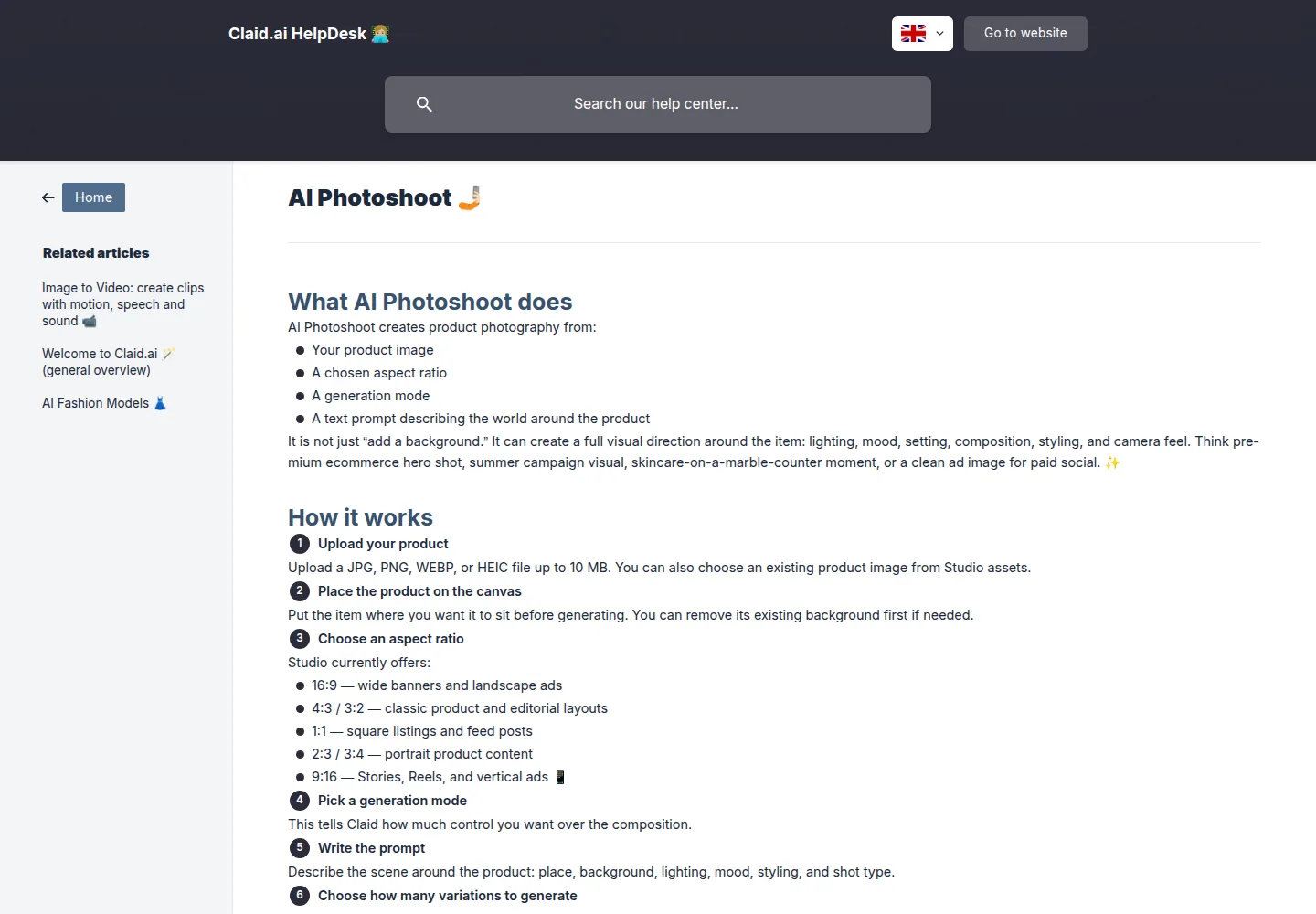
Open Claid Studio and upload the product. You can also reuse a product already stored in the Studio assets library.
Place the item on the canvas where you want it to sit. The helpdesk says to remove the existing background first when the shot calls for it.
Choose the aspect ratio that matches the destination.
Choose a generation mode. The helpdesk describes five.
Precise keeps the product where you positioned it and builds the scene around it. This is the mode for catalog work and brand templates. Creative lets the model choose the product’s position and scale from your prompt. Inspiration takes a reference image and follows its color, lighting and composition direction. Background takes a reference image as the scene and places your product into it. Product Swap treats a mockup style image as the base composition and swaps your product in.
Write the prompt with the documented formula. Their worked example: “A premium skincare serum on white travertine, surrounded by soft green leaves and a folded linen towel, warm morning sunlight from the left, clean spa mood, editorial product photography, shallow depth of field.”
Generate between one and four variations, then save the strongest result to your Creations library.
Two neighbouring tools are worth knowing. Remove Background produces cutouts with a transparent, colored or hex code background. Improve Quality and Upscale raises resolution by a percentage or by fixed multipliers. AI Backgrounds places a product into a ready made scene when you do not want to write a full prompt.
For repeated edits across a catalog, Claid also exposes an API. The developer documentation describes a declarative request to an image editing endpoint, API keys managed inside the account, and a quick start that resizes, sharpens and adjusts an image in a single call.
On this page
What to check in the result
Product fidelity first. The label, the shape, the color and the texture of the item must survive the new scene. Claid’s own documentation describes its current image editing model as stronger on texture realism and product preservation, so hold the output to that standard.
Placement, if you used Precise. The product should still sit where you left it on the canvas.
The aspect ratio matches where the image will be published.
The resolution matches the plan. Standard resolution is listed as up to 2K, and the full premium tools, including 2K and 4K generation, sit on Pro.
Edges and shadows around the cutout or the composited product. Zoom in before you accept the image.
The displayed cost before you generate. The helpdesk tells you to check the cost shown for the operation you selected.
Where it usually goes wrong
The prompt turns into a novel. The helpdesk asks for clear context without a wall of text, and gives a formula to keep it short.
The wrong mode for the job. Precise exists because placement matters in catalog and template work, while Creative hands composition to the model.
A weak source image. Small, angled or badly lit photos give the model less product detail to preserve.
Inspiration, Background or Product Swap used without the reference image the mode expects.
A rejected upload. Check the format and the file size against the documented limits before blaming the prompt.
Confusing image credits with video credits. Image to Video is a separate generation with its own duration and its own cost.
What the plan allows
The pricing page lists these tiers.
Free trial: 50 credits to use on any operation, access to all Standard tools, and 50 API credits to explore the API. Essentials: $9 per month, 500 credits, standard resolution up to 2K. Pro: $35 per month, 2,000 credits, full access to all premium tools including 2K and 4K generation, and higher upload limits up to 64 MP. Business: custom pricing, with custom SLAs and setup.
Yearly billing saves $120 on the paid tiers. On cost per operation, the page lists operations from 2 to 8 credits, generations at 4 credits, and a video generation at 60 credits for a 5 second clip. The helpdesk says to check the displayed cost for the duration you select before generating.
What we did not do
Nobody on this site has used Claid AI. We did not sign up, upload a product image, generate a scene or run the API. Every step above is taken from the company’s helpdesk articles and API documentation, both listed in Sources.
We did not describe any screen or menu beyond the words the documentation uses, we did not test how closely a generated scene matches the original product, and we did not time a generation. We cannot tell you how often a particular item survives the process. Only a test on your own catalog can answer that.
Sources
Read on October 3, 2026.
AI Photoshoot, https://help.claid.ai/en/article/ai-photoshoot-76as8m/, Claid helpdesk. Welcome to Claid.ai, general overview, https://help.claid.ai/en/article/welcome-to-claidai-general-overview-oxluuk/, Claid helpdesk. AI Fashion Models, https://help.claid.ai/en/article/ai-fashion-models-uxdwts/, publisher update date September 15, 2026. Claid API Overview, https://docs.claid.ai/, publisher states it was last updated more than a year before this reading. Claid API Quick Start, https://docs.claid.ai/quick-start.md. E-commerce guide, https://docs.claid.ai/guides/e-commerce.md. Background operations, https://docs.claid.ai/image-editing-api/image-operations/background.md. Pricing, https://claid.ai/pricing, read October 3, 2026.
Update log
October 3, 2026: first version, built from the company helpdesk and API documentation listed above. No hands on test has been done.